This month, we’re streamlining party management for both guests and staff. Guests can now self-serve their party bookings from their online account — reducing phone calls, driving upsells and enhancing the overall party experience. Next up, you can set minimum and maximum limits for how many tickets guests can book, enabling smarter upsells and better group management. And, keep an eye out for the refreshed package setup UI in Venue Manager. It's easier to use and ready for exciting customization features on the way.
Read on for the details!
Refer to our changelog for all product updates and changes. To try some of our upcoming features in preview, switch to your Playground venue (preview release features are indicated below). See the ROLLER Playground guide for switching from your live venue to your playground venue.
Manage parties with ease using online accounts
Plan: Available on a Pro plan and above
Preview release: From 23 April in ROLLER Playground
Target release date: 29 April
Say goodbye to manual and time-consuming changes to party bookings. Guests can now self-serve their party using their online account, and have the flexibility to add or remove guests from their booking, as well as add extra food & beverage items or inclusions.
This reduces the manual workload for your staff (no more calls or emails!) while increasing upsell opportunities. It’s a modern, self-serve solution that helps venues run more efficiently and keeps guests in control of their event.
To learn more, read the guide Manage party bookings with ease using online accounts.
Watch the video below to see self-serve party booking edits in action.
This month, we've also updated the booking management UI to make it more streamlined and easier to set rules for specific products, like your party packages. To learn more, read the guide Configure online accounts in progressive checkouts.
Updated package product setup
Plan: Available on all plans
Preview release: From 23 April in ROLLER Playground
Target release date: 29 April
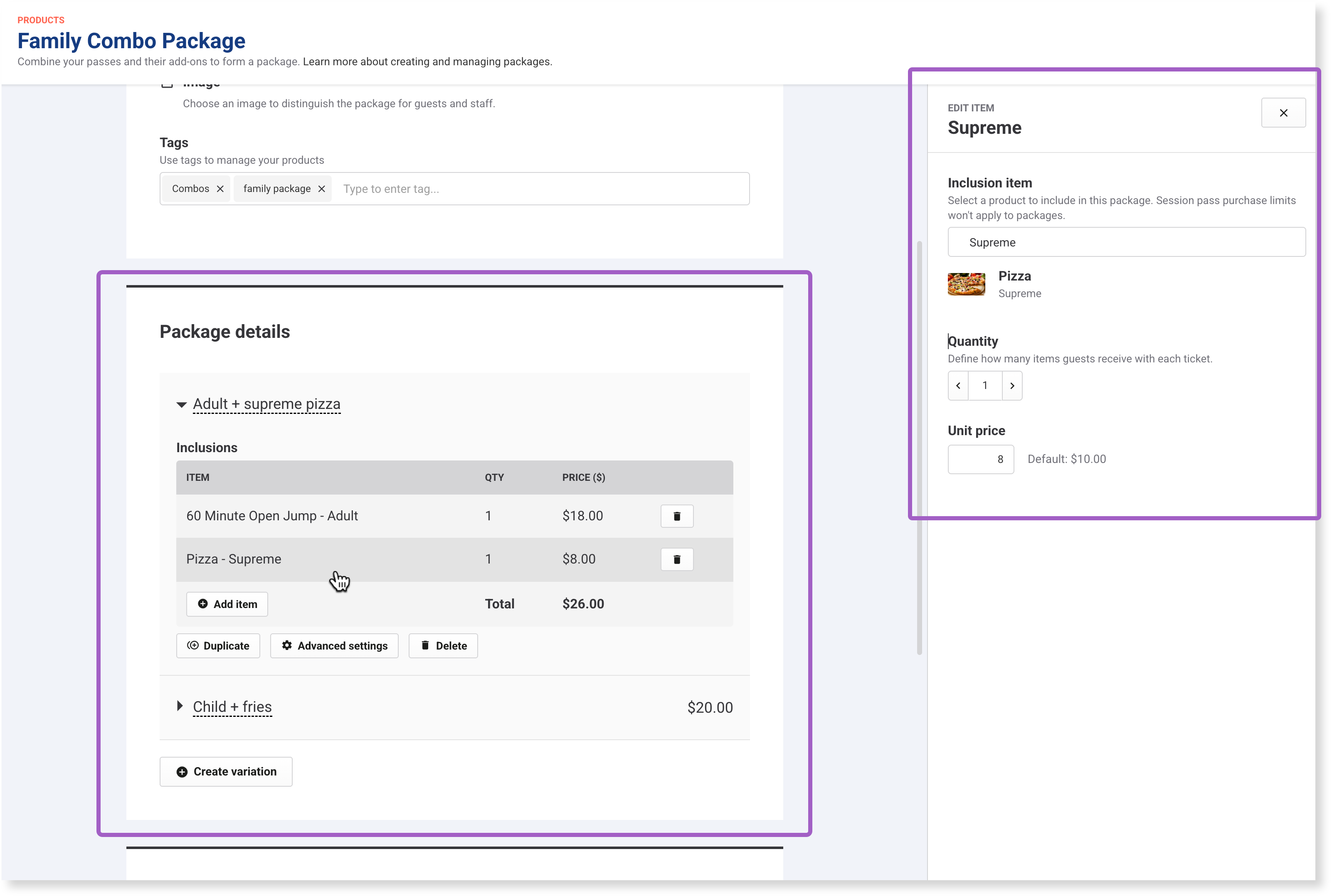
We’ve updated the Package details panel within the package product settings in Venue Manager to make it quicker and easier to configure bundled packages.
You'll see:
Set up for variations more consistent with party packages.
A new Advanced settings button to configure advanced options for each package variation.
A dedicated panel to add and manage bundled inclusions like session pass tickets, food, drinks and other items.
This UI-only update makes it simpler to manage packages today — and lays the groundwork for more customizable package features in the future. Watch this space!
Set min and max purchase limits per session pass product
Plan: Available on all plans
Preview release: From 23 April in ROLLER Playground
Target release date: 29 April
We’ve enhanced session pass settings to give you more flexibility when managing group bookings.
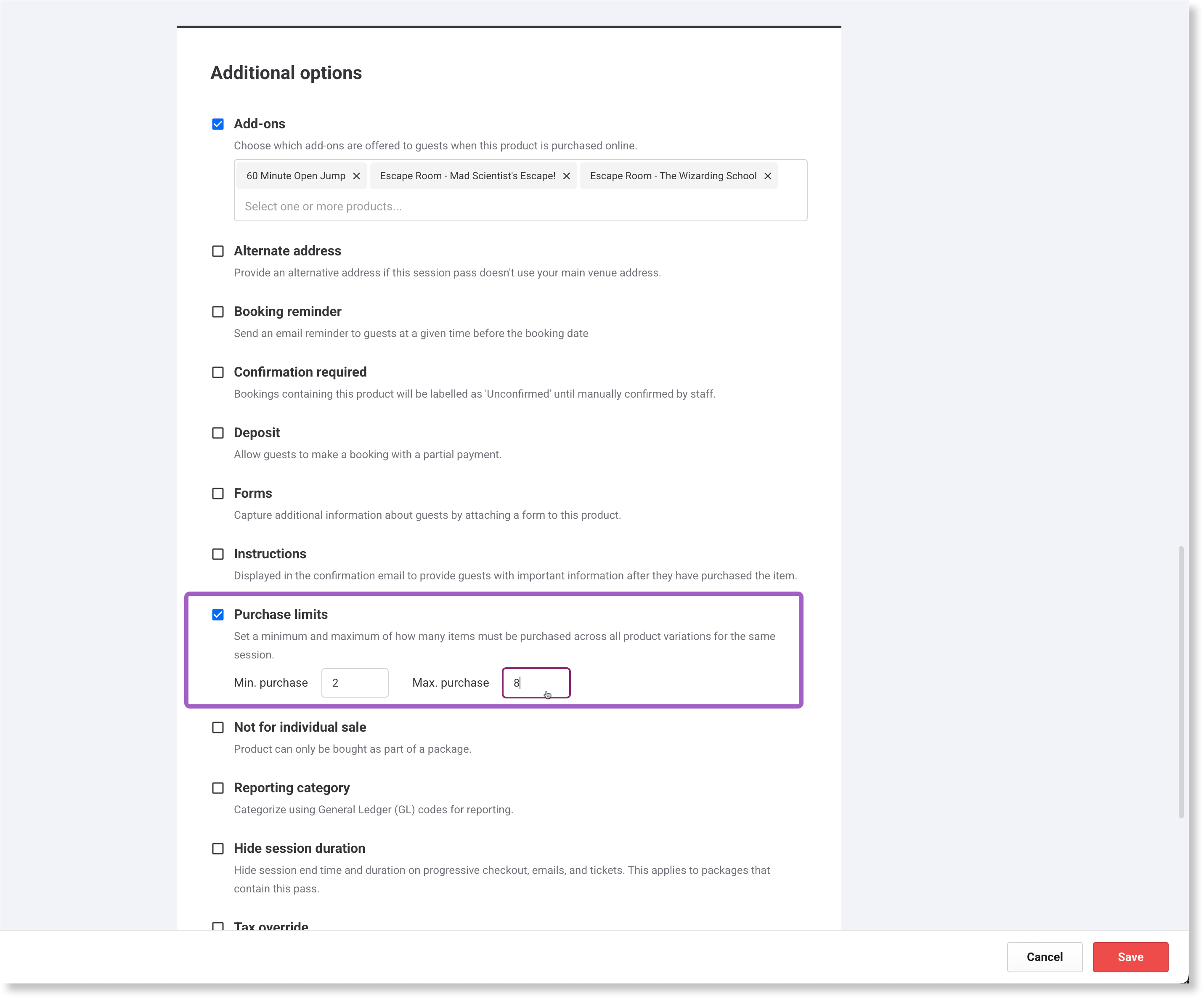
You can now set both minimum and maximum purchase limits for the same session, giving you better control over the total number of tickets booked across all ticket types (eg Adult, Child).
Example: Require guests to book between 4 and 8 tickets per session, regardless of how they’re split across ticket types.
Setting these limits helps you manage session capacity more efficiently. It prevents a group from splitting across multiple spaces by ensuring the entire group fits within a single activity resource (eg an escape room, bowling alley, mini-golf session space, or axe-throwing lane). This keeps sessions profitable, avoids operational issues, and improves the guest experience.
You can still set limits per ticket type in each variation’s advanced options. If minimum and maximum limits are set at both levels (across and within ticket variations):
Minimum purchase limits: the higher value applies
Maximum purchase limits: the lower value applies
This update helps:
Enforce group booking rules automatically for online purchases
Reduce manual workarounds
Increase average spend per guest
Guide the right ticket mix for group activities (eg max 6 tickets, including at least 1 Adult ticket for supervision)
Where to find the new max purchase limit setting
From Venue Manager, go to Products > All products.
Edit an existing session pass product or create a new one.
Scroll to Additional options > Purchase limits.
Set the minimum and/or maximum purchase limit of how many items must be purchased across all product variations in the same session.
To set limits per ticket type:
Select the variation (eg Adult, Child)
Expand Advanced options
Set minimums and maximums per ticket type to work alongside the product-level purchase limits
Other news
We’ve also got some compliance updates and an improvement to the guest segmentation export targeting April 29 release. The segmentation update will make it easier for you to send your guests physical items like membership cards or welcome packs.
Click-to-cancel changes for US customers
The Federal Trade Commission’s new click-to-cancel rule requires that canceling subscriptions (like recurring memberships) is as easy as signing up for them.
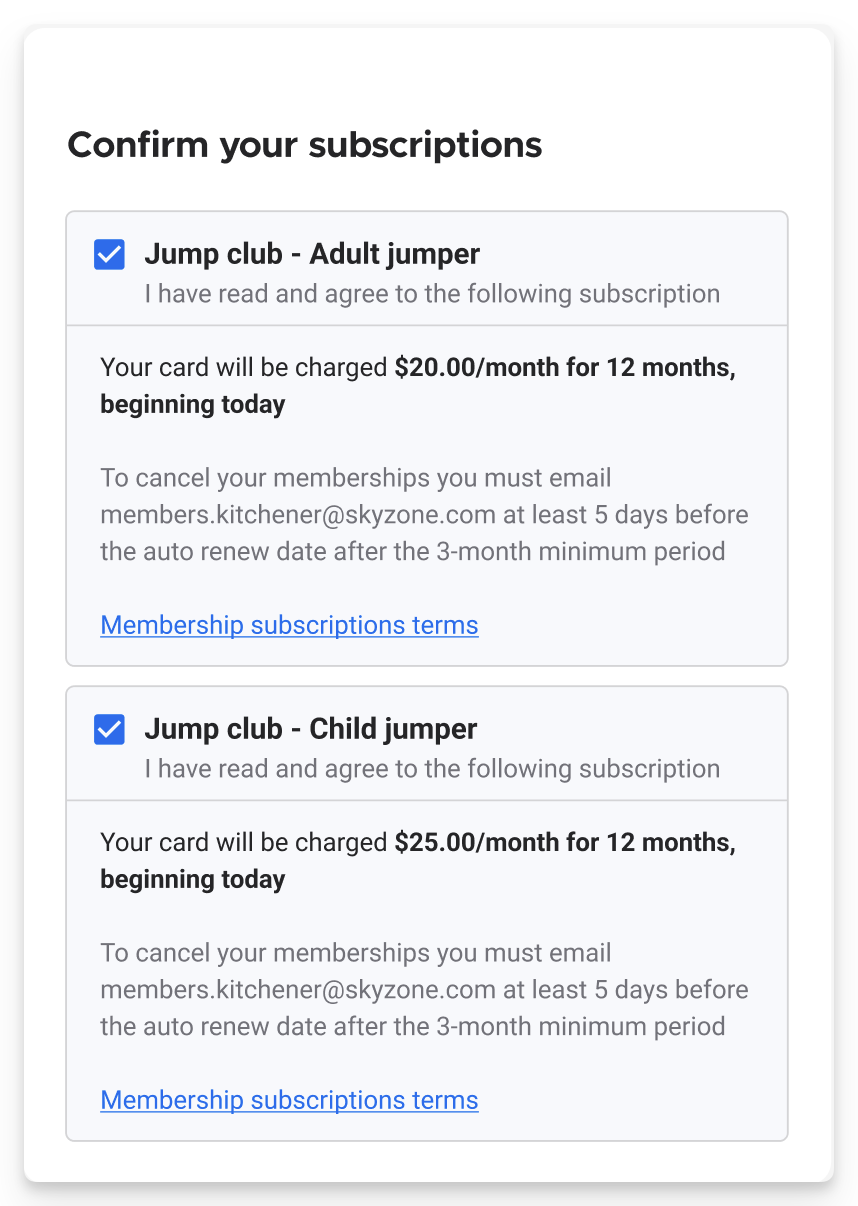
To support compliance, ROLLER has introduced a mandatory membership consent checkbox in the online checkout, which displays key membership terms and links to venue-specific terms and conditions, so guests know upfront what they’re signing up for and how they can cancel. This applies to guests who are paying for, upgrading or renewing their membership in the online checkout.
To learn more, read the guide US-based venues: Membership requirements for click-to-cancel rule.
Manual credit card entry removed for gift card sales in Venue Manager
Starting 29 April 2025, to meet PCI DSS compliance requirements, venues using ROLLER Payments will no longer be able to manually enter credit card details when selling gift cards from Venue Manager.
Instead, credit card payments for gift cards must be taken via secure payment request links — the same process already used when taking payments for bookings.
This update provides improved fraud protection through secure customer authentication (3DS secure), which helps verify the cardholder's identity, reduces the risk of chargebacks and makes sure we’re meeting global standards for secure credit card payments.
This change is required for PCI DSS compliance — a global standard that ensures credit card data is processed, stored and transmitted securely.
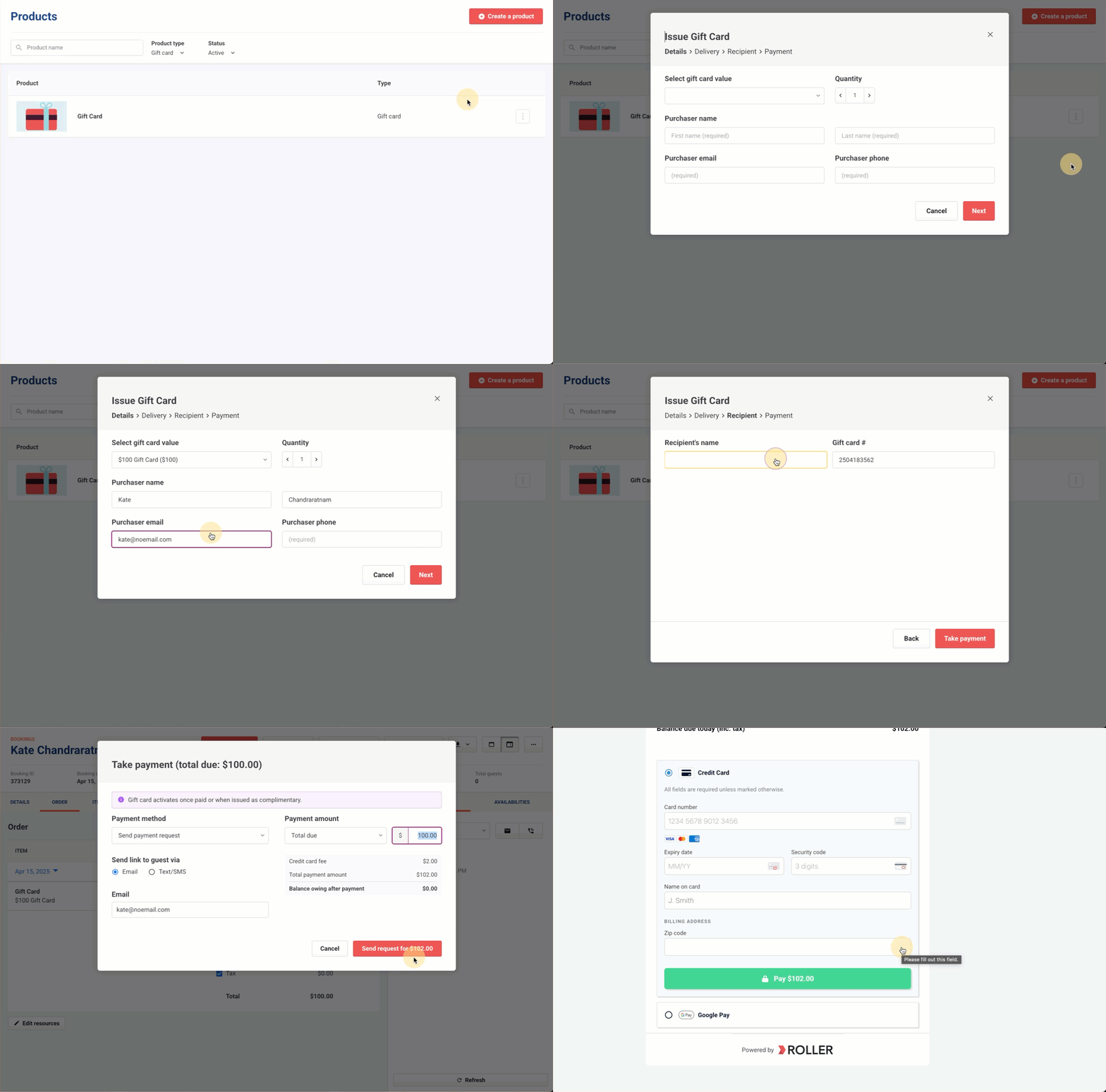
To learn more, read the guide Issue and take payment for gift cards from Venue Manager.
Full guest address fields now included in segmentation exports
You can now include full guest address details — street address, city, and state — in your segmentation exports. This small update makes it easier to send physical items like membership cards or welcome packs, especially if you rely on mailouts as part of your guest experience.
This update helps expand how you can use segmentation to connect with guests beyond digital channels.