You can issue a refund to a new gift card, instead of issuing a cash or card refund. This allows guests to use the gift card for future purchases at your venue. This guide will show you how to enable refunds to new gift cards from Venue Manager and POS.
Enable refunds to new gift cards
Step 1: Create product
Create the gift card product that will be used when issuing refunds to a new gift card. We recommend creating a separate refund gift card product for reporting purposes.
Follow the steps to create a gift card product.
Step 2: Configure refund settings
Nominate the gift card product to use when issuing a refund to a new gift card.
From Venue Manager, go to Settings > Account > Payments.
Scroll down to the Gift card refunds panel.
Select the gift card product that will be used when issuing a refund to a new gift card.
Select Save.
Issue a refund to new gift card from Venue Manager
Once you've configured the refund settings above, you'll be able to issue a refund to a new gift card from Venue Manager.
From Venue Manager, search for and open the booking.
Select the options menu (3 dots) on the top right, then select Refund.
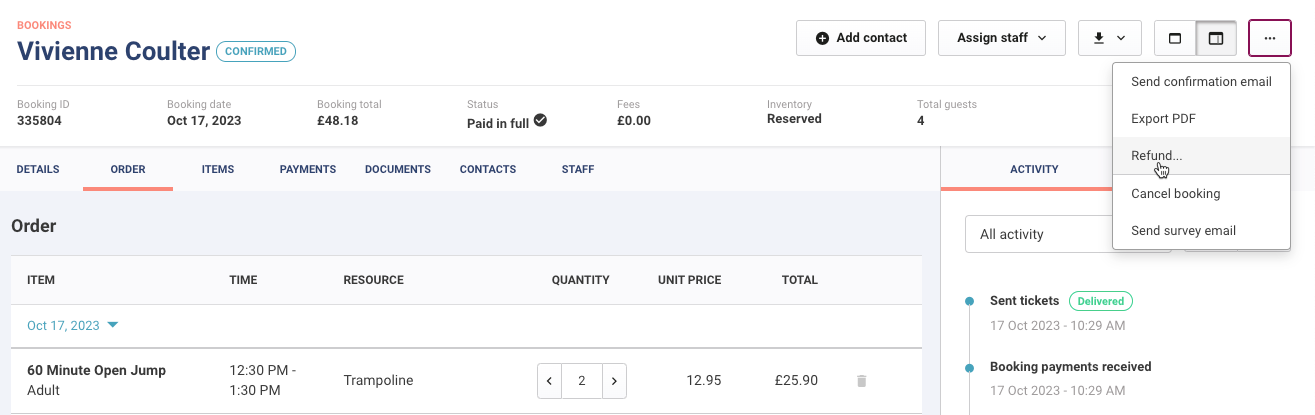
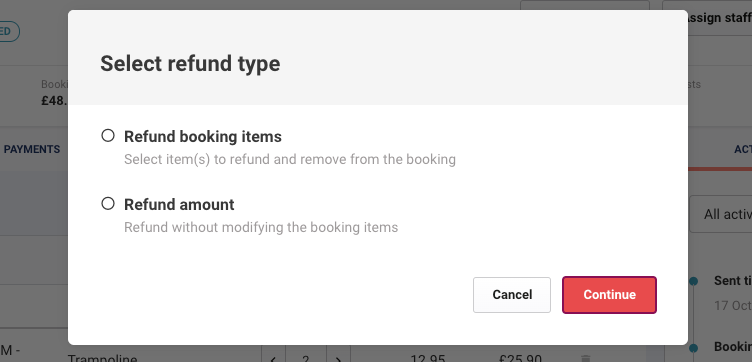
Select to refund booking items or amount, then select Continue.
Select Gift card as the Refund method.
Select Issue new gift card.
Select if the gift card will be physical or digital.
Select Refund.
For more information, refer to the guide Refund a booking from the Venue Manager.
Issue a refund to new gift card from POS
To issue a refund to new gift card at POS:
Search for and open the booking.
Select Refund.
Select Gift card as the refund method.
Select whether to refund to an existing gift card or to issue a new gift card.
Refund to an existing gift card | Please type in or scan the gift card number. If the gift card has expired, the refund will be applied but is unusable without an extension of the expiry date. |
Issue new gift card | Physical: Type in or scan the gift card number. |