This guide explains how ROLLER recognizes revenue under different accounting methods and how this affects your financial reporting.
Understanding when payments become revenue helps you see your venue’s true financial performance.
In ROLLER, guests often pay in advance — for example, booking next month’s event today. The payment is received immediately, but depending on your accounting method, it may not yet count as revenue.
What’s the difference?
The main difference between cash and accrual accounting is when revenue is recognised.
In ROLLER, revenue is recorded against bookings, which may have a future or current booking date.
Watch the video explainer to learn more.
Accounting method | Definition | Example |
|---|---|---|
Accrual | Revenue is recorded when it’s earned, not when payment is received. In ROLLER, this typically means when guests redeem tickets at POS or when tickets expire unused. | A guest buys a $100 pass on 1 July, valid until 30 July. If redeemed on 14 July = revenue recorded on 14 July. If never redeemed = revenue recorded on 30 July (expiry). |
Cash | Revenue is recorded when payment is received, regardless of when the service is delivered. | A guest buys a $100 pass on 1 July, valid until 30 July = $100 revenue recorded on 1 July. |
Deferred revenue
Deferred revenue applies only under accrual accounting and refers to money received for bookings not yet redeemed or expired (ie future bookings).
Accrual accounting reports deferred revenue
Cash accounting does not
Deferred revenue helps you understand how much has been collected but not yet earned.
Why accrual accounting can be helpful
Accrual accounting provides a clearer view of what your venue has truly earned and supports better decision-making. It also:
Aligns with international accounting standards
Supports accurate tax reporting
Helps manage cash flow forecasting
Is required for larger businesses or those with inventory in some regions
ROLLER automates all of this — tracking funds received, deferred revenue and recognized revenue based on your venue’s accounting method.
Choosing your accounting method
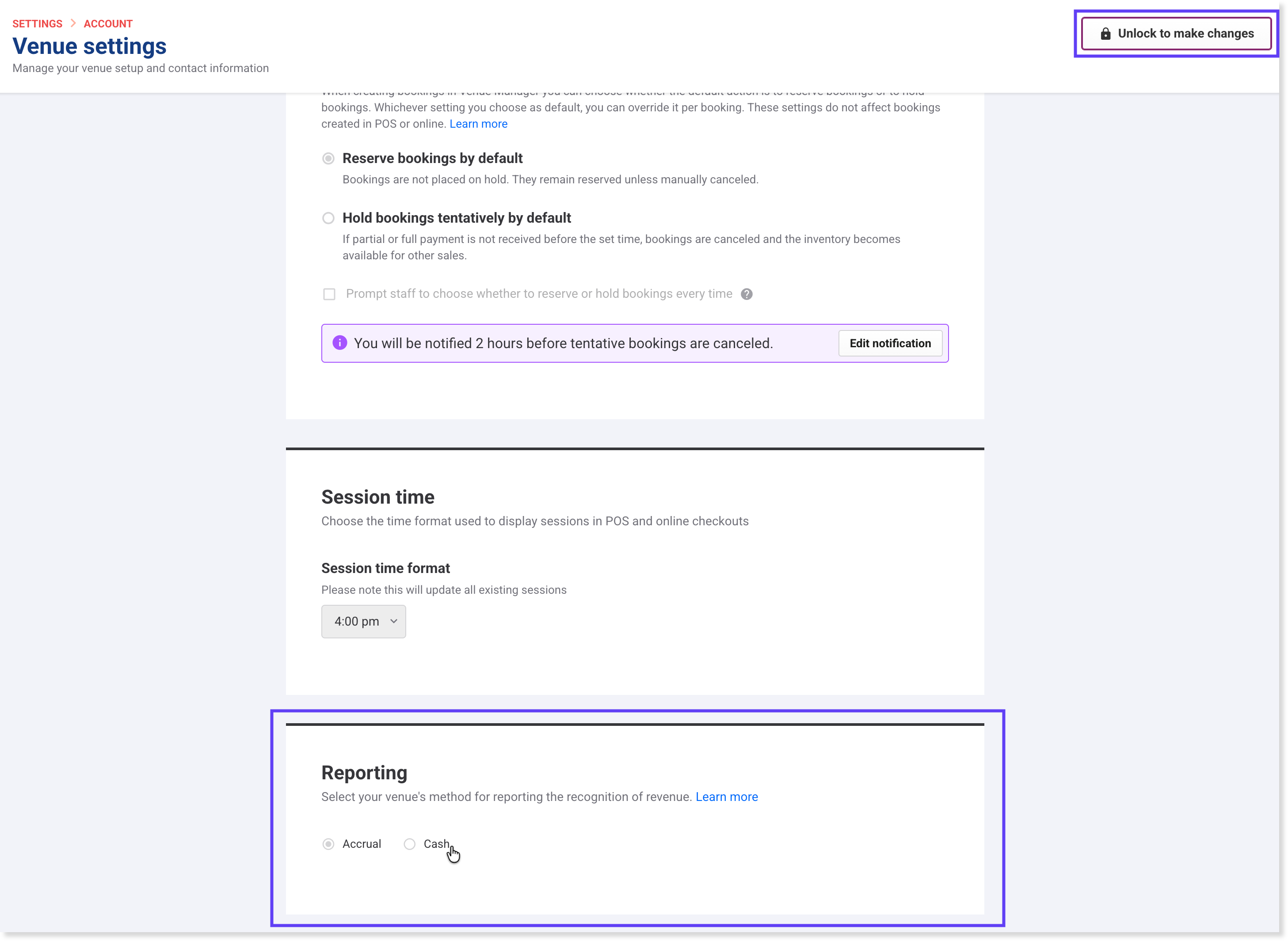
By default, ROLLER uses accrual accounting. You can switch to cash accounting if your business recognises revenue when payments are received.
To change your accounting method:
From Venue Manager, go to Settings > Account > Venue settings.
Select Unlock to make changes.
Scroll down to Reporting.
Choose Cash or Accrual.
Select Save.
When you enable cash accounting, ROLLER automatically:
Removes accrual-only reports (eg Deferred revenue report).
Hides the Revenue metric on the Venue Manager dashboard.
Updates all report data to reflect the cash method.
How ROLLER handles tax
ROLLER automatically tracks and reports tax based on your selected accounting method:
Cash accounting: tax recorded when funds are received
Accrual accounting: tax recorded when revenue is recognised
You can manage tax rates under Settings > Account > Taxes & fees, including default venue rates and product-specific rates. ROLLER supports both tax-inclusive and tax-exclusive pricing.
Key terms to know
Term | Definition | Relevance |
|---|---|---|
Funds received | Payments collected from guests, including tax, fees and discounts | Tracked under both cash and accrual accounting |
Deferred revenue | Payments received for services not yet delivered | Accrual only |
Net revenue | Revenue recognised when the service is delivered or the booking expires | Accrual only |
Accounts receivable | Money owed by guests for bookings not yet paid | Accrual only |
You can hover over these terms in ROLLER report column headers to see quick definitions.
Prepay online or walk in on the day
At most venues, guests can prepay online or walk in on the day.
Prepaid bookings: When guests book online and pay in advance, ROLLER records the payment as funds received and deferred revenue. When they attend and redeem their tickets at POS, ROLLER automatically moves that amount into net revenue.
Walk-in bookings: When guests buy tickets in person and use them immediately, ROLLER records both the payment and the revenue at the same time — there’s no deferred revenue, because the service is delivered on the spot.
This all happens automatically — no manual tracking needed.
Key takeaways
Accrual accounting recognizes revenue when services are delivered.
Cash accounting recognises revenue when payment is received.
ROLLER automatically tracks funds received, deferred revenue, and recognized revenue based on your venue’s selected method.
Familiarize yourself with your venue’s accounting method so you can interpret reports accurately.