The gift card sales dashboard tracks daily sales by channel, product variation and time period. It helps you measure total number of gift card sales, identify sales trends during peak seasons such as the holidays and uncover opportunities to increase revenue through optimized pricing, promotions and upsell strategies.
Access the dashboard
From Venue Manager, go to Analytics > Dashboards > Gift card sales.
The dashboard opens with a default view of gift card sales for the last 7 days.
Adjust filters
You can refine the sales data shown using the following filters:
Sales date: Select a different time range (eg Last 90 Days) to analyze seasonal trends.
Sales channel: Focus on specific channels such as POS, online checkout or Venue Manager.
Parent product name: Narrow down data to specific gift card types (eg $25 gift cards or custom amounts).
After adjusting filters, select the update icon at the top right to apply changes.
Review the metrics and charts for insights
The dashboard provides metrics and charts to identify trends and uncover growth opportunities.
Select the dashboard below to enlarge it, review the charts for standout trends and insights and continue reading for details.
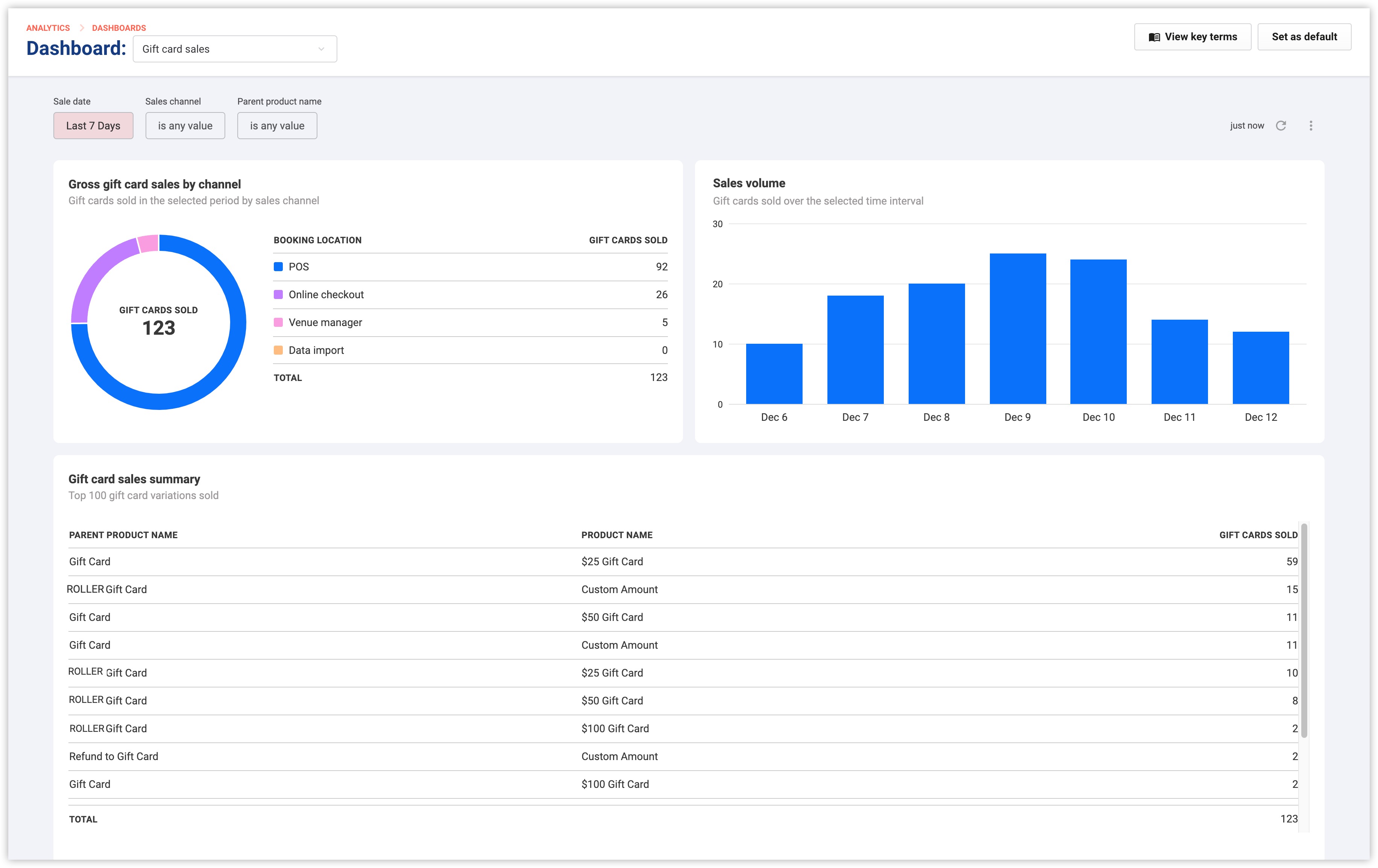
Metric | What it shows | Why it matters | Example opportunity |
|---|---|---|---|
Gross gift card sales by channel | Sales distribution across channels (POS, online checkout, venue manager, data import if applicable) | Identify top-performing channels. | If online sales lag, enhance the checkout experience with clearer product descriptions and visuals. |
Sales volume | Daily gift card sales trends for the selected period. | Spot peak gift card sales days and seasonal patterns. | Run promotions before high-demand periods, (eg the holiday season). |
Product sales summary | Top 100 gift card variations sold, including quantities. | Understand which products sell best and vary by channel (ie use the sales channel filter). | Promote bestsellers and refine for under performers. |
Identify insights and act on opportunities
Analyze the dashboard to identify opportunities from trends and insights and take action.
Top channels
Review the gross sales by channel chart to see where gift card sales happen.
Example: If POS is the top channel, train staff to upsell gift cards during peak times.
Daily trends
Use the sales volume chart to pinpoint high-purchase days like weekends or holidays.
Example: Run holiday campaigns and promotions leading up to busy periods.
Popular gift cards
Check the sales summary table to see which variations are most in demand.
Example: Focus marketing efforts on custom gift card amounts for personalized gifting.
Boost online sales
If online checkout lags, optimize the experience with better visuals, descriptions and seasonal bundles.