Questions
How do I add a product with an unspecified price to sell at POS?
How do I set up a product at POS with a price that can be customized?
How can I add a product to POS where the price can be entered at the time of sale?
Solution
First create the open price product using a stock product type.
From Venue Manager, go to Products > Create product > Stock.
Enter the name (eg Sandwiches) and description.
Add an image for the open price item (optional).
Select the reporting category (optional).
Change the tax rate if different from the venue's default tax rate set.
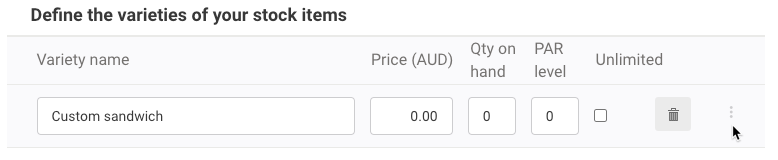
Enter the name for the variety to sell at POS (eg Custom priced sandwich).
Select the options menu (3 dots) for the variety.
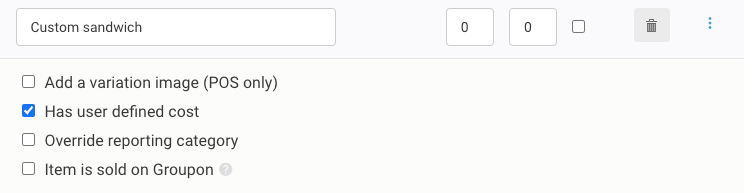
Select Has user defined cost.
Add any other varieties you'd like to make available to sell (optional).
Select Save.
Then add the stock item to a POS menu. Learn more
When adding the item to the cart at POS, cashiers will be asked to enter a custom price for the item.
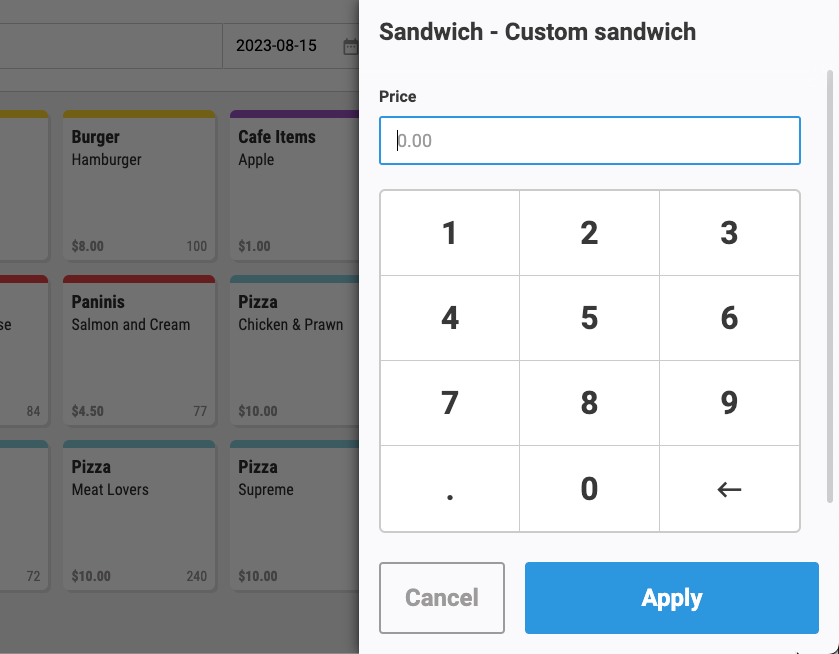
Track revenue coming into your till by creating an open product with a clear name such as "Arcade Revenue." Set the tax rate to 0%, select it in POS, enter the amount, complete the transaction, and cash will be recorded. A clear name helps identify transactions in reports.