You can settle an overdue ROLLER invoice in a few minutes with a credit card or direct debit, or pay by bank transfer if you prefer. Paying promptly keeps your team's access to Venue Manager uninterrupted.
Check whether your invoice is overdue
When invoices are past due, you'll receive a Payment overdue popup warning in Venue Manager prompting you to Pay Now.
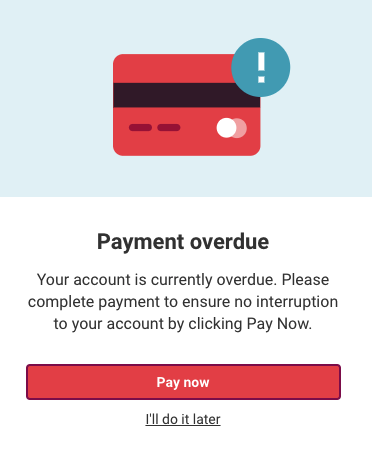
Pay an invoice online using a credit card or direct debit
You can select the Pay Now button in the pop-up as shown above.
Alternatively, in Venue Manager, select your account icon at the bottom left of the main menu, then under your venue name, select Pay invoices.You will be taken to a separate secure payment page, listing all the invoices that are overdue.
Select Pay now to enter new payment details or use the already stored payment details to make the payment.

Pay an invoice through bank transfer
If you've selected direct debit to pay your invoices, the payment will not be processed immediately. Direct debit and ACH payments are collected 2-3 days after the invoice is issued and can then take 3-4 business days to process.
If you're locked out of your account due to non-payment, we recommend paying using a credit card to get instant access and avoid prolonged account restrictions.
You can pay for your invoices through bank transfer using the following bank account details in each market and relevant currency:
If you have a stored payment method, ROLLER keeps retrying that card while an invoice is overdue. Contact your customer success manager or the support team before paying by bank transfer so you are not charged twice.
Australia (AUD)
Account Name: ROLLER Networks Australia Pty Ltd
Account number: 391928147
BSB number: 082309
Reference: your invoice number
New Zealand (NZD)
Account Name: ROLLER Networks Australia Pty Ltd
Account number: ROLLRNZD01
SWIFT code: NATAAU3303M
Reference: your invoice number
United Kingdom (GBP)
Account Name: ROLLER NETWORKS LIMITED
Account Number: 96222587
UK Sort Code: 23-14-70
IBAN: GB25 TRWI 2314 7096 2225 87
Address: TransferWise 56 Shoreditch High Street, London, E1 6JJ, United Kingdom
Reference: your invoice number
Europe (EUR)
Account Name: ROLLER NETWORKS LIMITED
BIC/SWIFT: TRWIBEB1XXX
IBAN: BE91 9670 2876 1876
Wise's address: Avenue Louise 54, Room S52, Brussels, 1050, Belgium
Reference: your invoice number
For ACH delivery United States/Canada (USD)
Primary Bank Routing Number: 322271627
Account Number: 80009866130
Account Name: ROLLER NETWORKS USA INC
For wire transfers United States/Canada (USD)
Bank name: JP Morgan Chase
General Bank Reference Address: JPMorganChase New York, NY 10017
Bank Routing Number: 021000021
SWIFT Code: CHASUS33
Account Number: 80009866130
Account Name: ROLLER NETWORKS USA INC
Reference: Your invoice number
If you have any questions about how to pay invoices, contact your customer success manager or the support team.