Identity verification
To qualify for payouts and comply with financial regulations, we need to verify your information. Know your customer (KYC) is a process used by financial institutions to verify the identity of their customers, helping prevent fraud and ensuring secure transactions.
This article describes the process and key requirements of the Know Your Customer (KYC) identity verification process that you must complete to process and receive funds if you're using ROLLER Payments.
It's important to review this entire article prior to submitting your data in the KYC form. Incorrect submissions will cause delays in getting you live on ROLLER Payments.
How does it work?
The KYC verification process is managed by our payment processing partner Adyen. However, you access the verification portal from Venue Manager in ROLLER.
The process to complete KYC verification is as follows:
Collect required identity documents
Review the section Verification requirements and documents below and gather scans or photos of the documents for uploading to the Adyen verification portal in ROLLER.Access the verification portal in Venue Manager
From Venue Manager, go to Settings > Integrations > ROLLER Payments and select Launch verification. The Adyen verification portal opens from ROLLER in a new browser window.Complete and submit verification
Follow the instructions in the verification portal to submit the information and documentation required.Monitor status
You will receive email notifications as the verification is assessed. Each verification generally takes 2 to 5 business days to be processed.
If a particular verification fails, you will receive an email outlining the cause. It's critical that you immediately return to the Adyen verification portal in ROLLER and rectify as the verification must be completed and approved within 30 days of initial submission.
Verification deadline
You are required to successfully complete the verification process before you can receive payouts of any funds processed. Furthermore, if the verification process is not completed within 30 days of the first transaction, ROLLER Payments may need to suspend your ability to take payments temporarily until we can fully verify your business.
Access the KYC verification portal
From Venue Manager, go to Settings > Integrations > ROLLER Payments and select Launch verification.
The Adyen verification portal opens in ROLLER. Follow the instructions on screen to enter and submit the required information and documents for verification.
Verification requirements and documents
Identity verification: Business owners
As part of the checks for an organization, you're required to verify the identity of all business owners. We refer to these individuals as owners, controllers, and signatories.
At a minimum, you must verify the following people (note that they can be the same person):
1 controlling person (Controller) who makes major business decisions
1 signatory who has signing authority
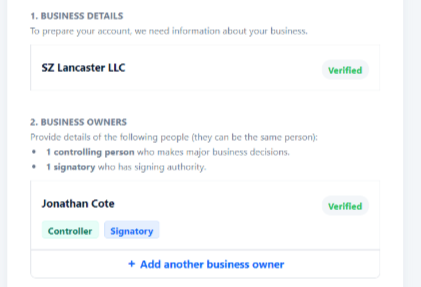
The table below describes the criteria for identifying them, and the minimum required number for each.
Who | Criteria | Required number of individuals |
|---|---|---|
Owners | Individuals who directly or indirectly own 25% or more of the total shares, voting rights or other equity in the business. | Between zero to four. Adyen requires information about all individuals that fit this criterion. |
Controllers | Any individuals who exercise ultimate effective control in making decisions for the whole company. If such an individual cannot be identified, then members of senior management must be identified as controllers. | At least one. Adyen requires information about all individuals that fit this criterion. |
Signatories | A person who has signing authority | At least one. All signatories are required to be identified. |
Trust ABN or NZBN verification (AU/NZ Only)
Adyen's requirements for onboarding a business with an ABN or NZBN registered as a trust in Australia or New Zealand require a few more details, given there are more responsible people involved in this business structure.
What are the requirements for onboarding a trust-registered business?
Trust Deed
Your business will be required to upload a copy of the entire trust deed, so you’ll need to have this on hand, preferably a digital copy. This will include the initial trust deed AND any deeds of variation (if the trust has been modified in any way since the initial set up, a trust may also have a “deed of variation”, showing any changes made.) You’ll also be required to identify the people or entities that fulfil a certain role in the trust, listed below. These roles are usually found on the Schedule page of a trust, which is generally found towards the end of the trust.
Settlor
The settlor’s role is as the creator of the trust. This may also be referred to as the founder or the grantor. Adyen requires us to identify at least one settlor to onboard a trust.
Trustee
The trustee’s role is as the main person/s or entity/entities that manages the disbursement, accrual and disposal of assets in the trust. Adyen requires us to collect the details of ALL trustees named in the trusts. Trustees may be an individual or a company, and the onboarding page will prompt you to select which one they are when entering the details.
Protector
Protector is a blanket term for multiple roles that might be detailed in a trust. This includes things like: custodian, appointor, nominees, managers, and guardians. Not all trusts have a protector, but if a trust has any kind of protector Adyen will require the venue to identify this person. Protectors can only be an individual. If you’re not sure whether you have a protector on your trust, we advise checking in with your accountant or financial controller.
Defined Beneficiary
A defined beneficiary is an individual or entity for whom the trust operates. Defined beneficiaries can be either a company or a single person, and Adyen is required to verify the identity of all defined beneficiaries listed on the trust. Not all trusts have defined beneficiaries - if they don’t, they will have undefined beneficiaries.
Undefined Beneficiary
Similar in role to a defined beneficiary, undefined beneficiaries are not named explicitly on the trust deed, but are referred to in a meaningful way in the Schedule page. This may be harder to identify - if the trust deed does not have defined beneficiaries, we recommend reaching out to your accountant to confirm the undefined beneficiaries may be helpful.
What kind of information is required for the above trust members?
If the role is held by an individual, Adyen will require:
Full name
Date of birth
Residential address
If the role is held by a company or other entity (like a partnership), Adyen will require:
The entity name
ABN, ACN or NZBN of the entity
The address that the entity is registered at
If the trustee is a company or other entity, Adyen may require information on the people who control that company, such as name and date of birth.
Information required for individuals associated with your business
The following details are required for each individual associated with your business:
Full name - must exactly match the photo ID uploaded
Residential address - a PO Box as your address is not accepted
Date of birth
ID number (see table below for the countries this applies to)
Email
Phone number - including country code (mobile number is recommended for faster verification)
In addition, you may be asked to provide additional information or documents, such as a copy of the individual's identification document (passport, driver's license, etc.).
Countries requiring ID number
The following countries require an ID number to be provided for each individual associated with your business:
Country | ID type | Example |
|---|---|---|
United States | Social security number | 123-45-6789 or 6789 |
Brazil | Cadastro de Pessoas Físicas (CPF) number | 614.492.110-97 |
Canada | Social insurance number | 123-456-789 |
Denmark | CPR-nummer | 220550-6218 |
Italy | Codice fiscale | MLLSNT82P65Z404U |
Business information required
The following business information is required:
Phone number
Business registration number (table below shows to which registration number is required)
Trading name
Legal business name
Address
Registration number by Country
Country | Registration number | Example |
|---|---|---|
Australia and New Zealand | Australian Business Number (ABN), | ABN: 51 064 874 531 |
Austria | Firmenbuchnummer | FN123456m |
Canada | Social insurance number | 123-456-789 |
Belgium | Company Number/Numéro d'entreprise | 1234567890 |
Brazil | CNPJ | 42.318.949/0001-84 |
Canada | Business Number | 123456789 |
Czech Republic | IČO | 123 45 678 |
Denmark | CVR-nummer | 22756214 |
Finland | Y-TUNNUS | 1234567-8 |
France | SIRET number or | SIRET: 542051180-00066 |
Germany | Handelsregisternummer | HRB 100484 |
Ireland | Company Number | 123456 |
Italy | Codice fiscale or | Codice fiscale: 00470400011 |
Netherlands | Kamer van Koophandel | (KvK) 34179503 |
Norway | Organisasjonsnummer | 923 609 016 |
Poland | Numer KRS or | Numer KRS: 0000123456 |
Portugal | NIPC | 123456789 |
Spain | Número de Identificación Fiscal (NIF) | A39000013 |
Sweden | Organisationsnummer | 202100-5489 |
Switzerland | UID/IDE/IDI or | UID/IDE/IDI: CHE123456789 |
United Kingdom | Company Number | 04366849 |
United States | Employer Identification Number (EIN) | 101002749 |
Bank account verification
The following information is required in the form fields to verify the business bank account which will receive payouts:
Owner name (must match the “Legal business name” as provided in the Company verification)
Iban or Branch code and account number
Country code
Currency code
If Adyen is unable to verify a bank account, you may be required to upload a bank statement. Any uploaded document will need to meet the following requirements.
Bank verification document upload (where applicable)
Important requirements
Bank logo or bank name in a unique font
Bank account details
Legal Business Name
Must be dated (no more than 12 months old).
Document format
Allowed formats: jpeg, jpg, pdf, png
Minimum allowed size: 1 byte for PDF, 10 kB for other formats
Maximum allowed size: 10 MB
No maximum on the number of pages for PDF
Accepted document types
Online banking environment (downloaded file or screenshot)
Bank issued statement (downloaded file or screenshot)
Photo identification
Each shareholder or UBO as outlined in the Identity verification section abvoe is required to submit a photo ID document. The table shows the supported photo ID documents and the data that be provided for that document:
Supported photo IDs
Document | Data |
|---|---|
Passport | Data page |
ID card | Front and back |
Driver's license | Front and back |
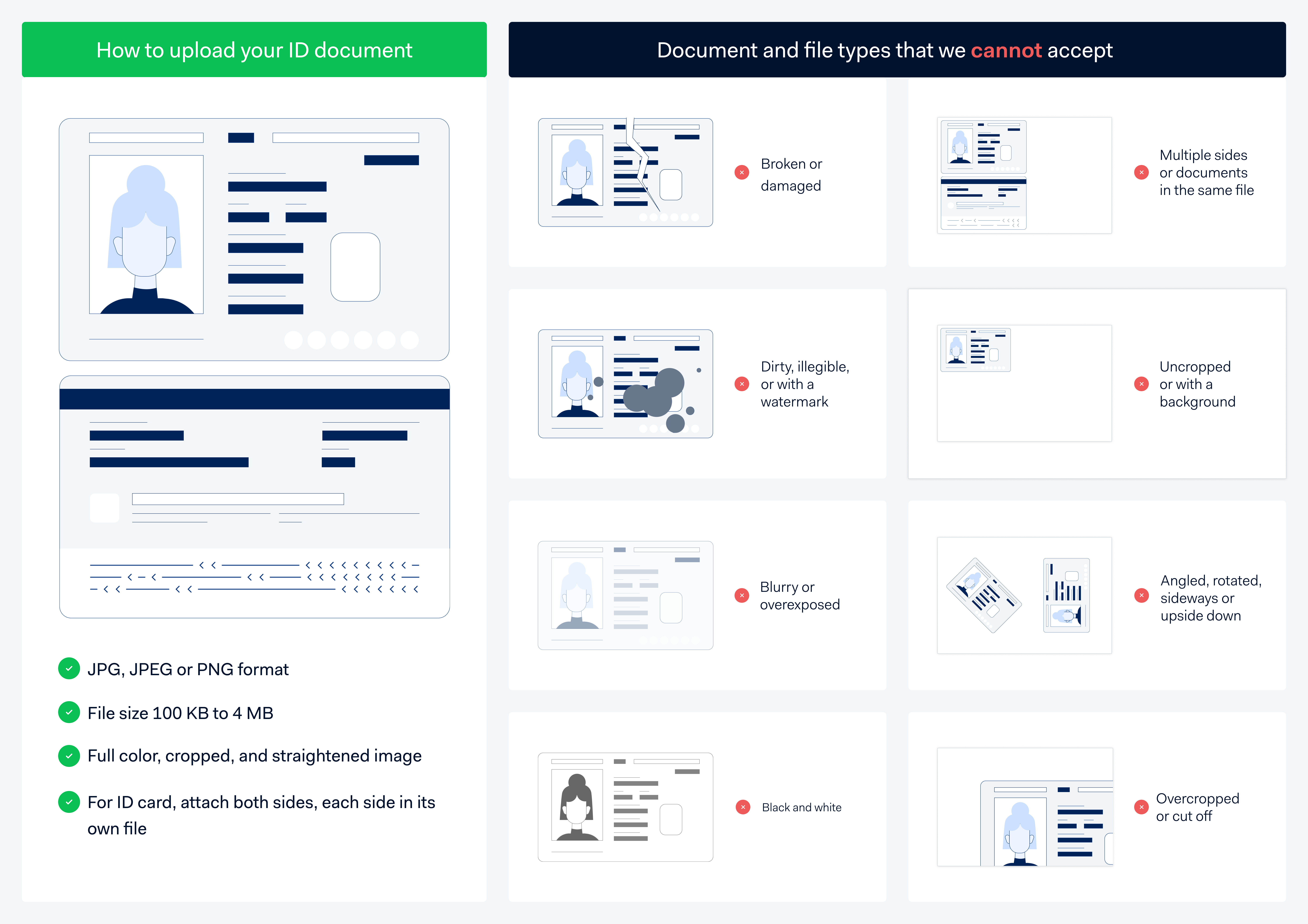
When you upload a photo ID, it must meet the following requirements:
Non-expired
Must be in color
MRZ must be visible (if available).
Separate file for front and back of the ID document (only when providing an ID card or driver's license).
Allowed formats: JPEG, JPG, PDF, or PNG
Minimum allowed size: 1 KB for PDF, 100 KB for other formats
Maximum allowed size: 4 MB
Maximum allowed pages for PDF: 2
Refer to this document upload guide below:
Tips when submitting your information
When submitting company verification
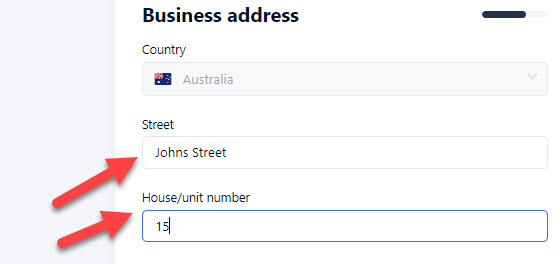
Street number & address must be entered into the two separate fields
All fields must be populated and if there is no applicable entry, you will use duplicate information for both lines (ie for an address with no street number, the street name would be added twice)
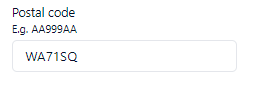
In UK / Europe: Ensure your postcode doesn't have any spaces
When submitting bank verification
Make sure that the business name on your bank statement matches the legal business name submitted within your Company verification
The Bank document submitted can't be older than 12 months
You can't submit an empty cheque as verification
When submitting identity verification
All people associated with the business:
1 x Controller and 1 x Signatory are always required (they can be the same person)
Any business owners (Owners)
One person can have multiple roles
Make sure the identity verification document submitted (passport, government issued ID or driver's licence) are straight and no part of the document is cropped out
Periodic Customer Reviews
As part of ROLLER Payments' obligations around customer due diligence, we may reach out from time to time to ask that you log into the Hosted Onboarding page in Venue Manager and verify that your business details are accurate and up to date. We'll send you an email with the timeframe we need you to check this by. If this is not completed within the timeframe specified, ROLLER Payments may need to temporarily suspend your payouts until we can verify this information.
From the email, you can log into Venue Manager and navigate to Settings Integrations ROLLER Payments and click Launch verification.
The Hosted Onboarding page will direct you to any specific details that need to be reviewed - we recommend reviewing all details entered here and making any adjustments necessary. Once everything is up to date, click submit.
Frequently asked questions
A relative of mine is a UBO, but does not have a passport. Do they need to be included in the verification checks?
Yes. If applying as a business, identity check will need to be completed for each shareholder or Ultimate Beneficial Owner (UBO) with >25% ownership.
Why haven't I received a status update since submitting my verification?
Times can vary on processing verifications, some steps are automated and others are manual checks. It can take between 2 to 4 business days and Adyen are based in Europe.
If you have not received a response after 5 business days submit a ticket and our ROLLER Payments team will get in contact.