You can export guest data stored on ROLLER to a CSV file.
Once exported the data includes:
Customer ID
Full name
Email
Mobile
Gender
Total spend
Total discount
Post code
Joined date
Date of birth
Address
Suburb
State
Accept marketing
Last booking
Date
Number of bookings
Spend on last visit
To export these details to CSV:
From Venue Manager, go to Guests > All Guests.
Select the options menu (3 dots) at the top right of the page and select Export.
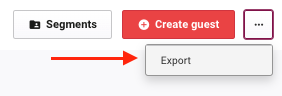
A CSV file containing the guest records automatically downloads to your local device.