Questions
How can I report on the total number of ticket redemptions at my venue?
Can I see how many people attended my venue during a given time period?
Requirements
This solution uses the Attendance report. You must have the Can access guest reports role permission enabled to access this report. Administrator and manager system roles have this permission enabled by default.
Solution
If you would like to report on the total number of redemptions at POS at your venue during a given time period, then the Attendance report is great to use. This gives you an indication of attendance at your venue and relies on staff checking guests in accurately at POS.
You can view:
The total quantity of redemptions at POS.
Which device each ticket was redeemed at.
Which products guests redeemed the most.
To access the Attendance report, follow the steps below.
From Venue Manager go to Reports > All reports.
Search for and select Attendance. Or, scroll down to Guests and select Attendance.
Use the filters to narrow down the data you need and then select Apply filters. For example, if membership product variation purchases are being checked-in at POS, you can exclude this from your filters by selecting ticketed products only (eg, session passes, standard passes, and party packages).
To save your filtered view, select the drop-down arrow next to the Attendance heading and then select Save new view.
Understanding the Attendance report
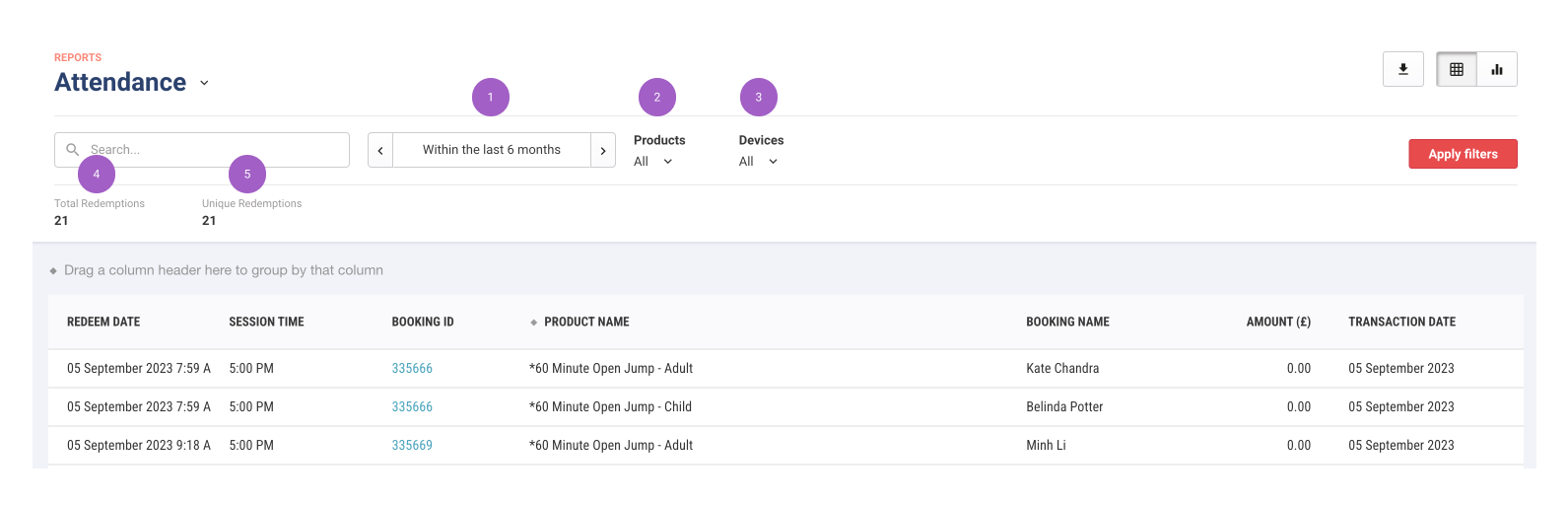
Use the Date filter to narrow down attendance to a specific date or date range.
Use the Products filter to only see attendance for specific products.
Use the Devices filter to see which devices checked in which tickets.
Total redemptions is the total count of ticket redemptions at POS during the filtered period.
Unique redemptions is the total count of ticket redemptions excluding multiple redemptions of the same ticket during the filtered period.
Difference between bookings and attendance
Learn more in the guide Why does the Bookings report not match the attendance report?
For more details, see the guide Attendance report.