The Monthly fee & tax statement summarizes the ROLLER Payments fees and sales tax you paid each month. Use it as your tax receipt for payment fees, and hand it to your bookkeeper when you close the month. Only account owners and billing contacts can open it, and only at venues on daily net settlement.
The permissions required to open and download your statements are Can access Accounting reports and Can manage payments. The administrator role has both enabled by default.
Find what's stopping you
You'll find the statement in two places: Reports > All reports, and ROLLER Payments fee statement under the account icon (person) at the bottom of the main menu. If it's missing, find what you're seeing, then follow the fix in the same row.
If you see | Why | What to do |
|---|---|---|
The statement isn't in either place | You're not an account owner or billing contact for this venue | Ask someone who manages staff in Venue Manager to make you a billing contact. See Make a staff member a billing contact below. |
You can open it at one venue but not another | Billing contacts are set for each venue | Ask to be made a billing contact at the other venue too. |
You're a billing contact, but the statement still isn't there | Your venue isn't on daily net settlement. ROLLER adds the statement only for venues on net settlement | Contact your customer success manager or the support team. |
Your statements aren't ready yet. | ROLLER generates statements monthly | Your statement shows here once it's ready. |
Make a staff member a billing contact
When someone new needs the statement (eg your bookkeeper), make them a billing contact for your venue. Billing contacts also receive ROLLER invoices and billing emails, so choose someone who should get them.
The permission required to make a staff member a billing contact is Can access staff settings. The administrator role has this permission enabled by default.
From Venue Manager, go to Settings > Staff > All staff.
For the staff member, select the options menu (3 dots).
Select Make Billing contact.
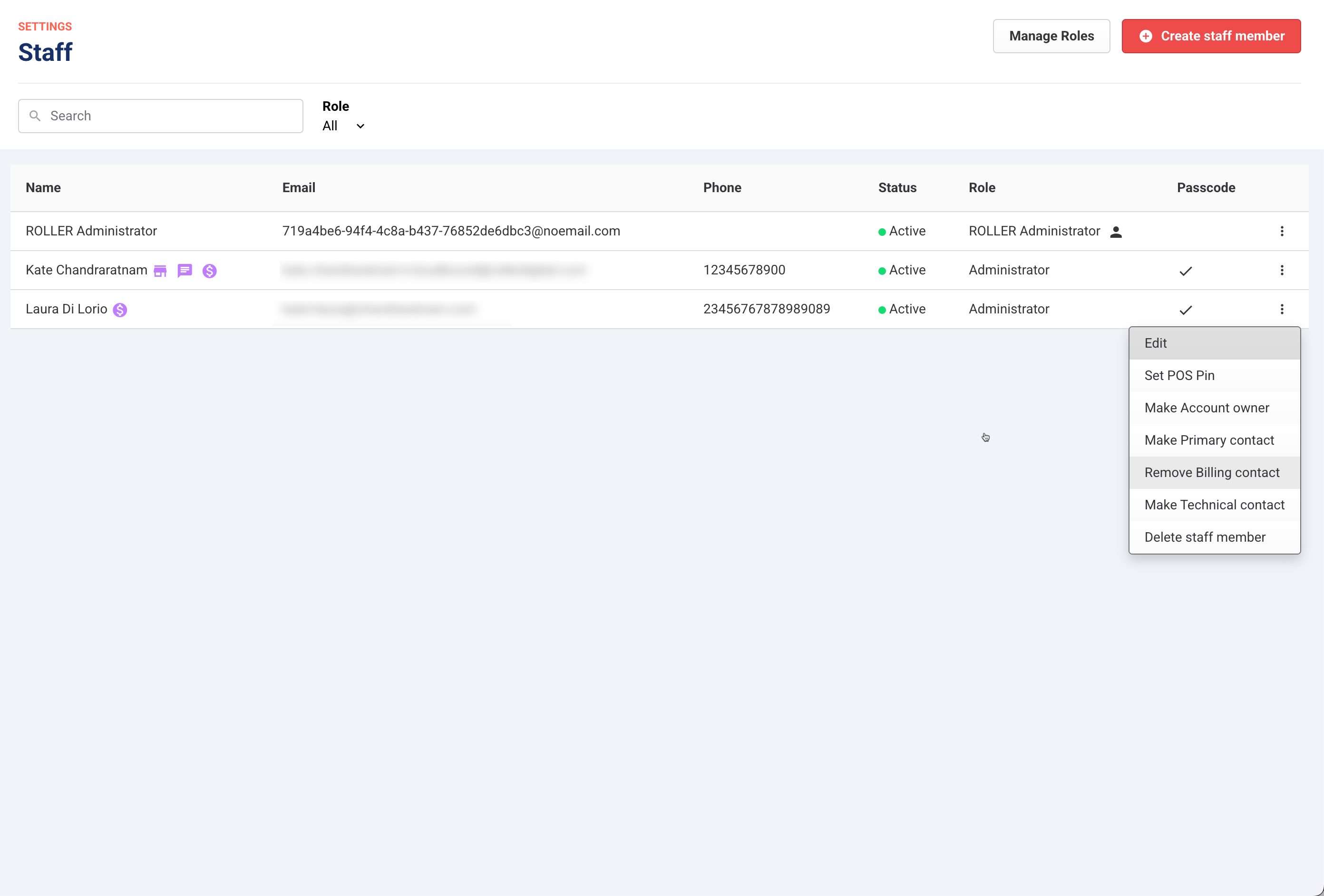
They can then open the statement from Reports > All reports, or from ROLLER Payments fee statement under the account icon, as long as their role has both permissions listed above.
To remove a billing contact, see the guide Add staff members as billing contacts.