The party summary makes managing parties and events easier for you and your team. Each page focuses on one event and lists details like the booking name and contact details, party host, booking items, food options and more. You control what shows up in this summary by selecting filters at the top of the run sheet grid.
This guide shows you how to create and download a custom party summary for the day, as a printable PDF document that you can share with your team.
What's included
The party summary document orders bookings by booking start time, one booking per page, based on the filters selected in the run sheet grid.
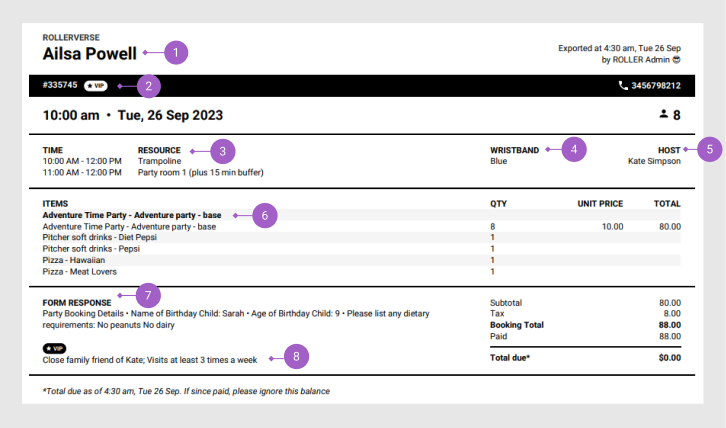
Here's an example of how a party package product booking may be displayed based on the filters selected and other details associated with the booking.
# | Description |
|---|---|
1 |
|
2 | Any guest flags associated with the booking holder |
3 | Resources and times they're being used |
4 | Any wristbands associated with the product |
5 | Any party host associated with the booking. You could print an individualized party summary for each of your party hosts |
6 |
|
7 |
|
8 | Any comments for guest flags associated with the booking holder |
The total booking cost is shown, with a break down of any discounts, fees, deposits paid and any outstanding amounts.
If you're after a more condensed, line-by-line view of the day, take a look at the run sheet, which you can also download as a printable PDF.
How it works
Select the filters you want at the top of the run sheet grid (eg party products). What you select here will appear in the party summary.
Once you're happy with the filters, download the party summary as a printable PDF.
Print and share the party summary with your team for the day's events.
Column modifications in the run sheet grid don't affect your party summary.
Filter and download the party summary
From Venue Manager, go to Bookings > Run sheet.
The default view shows all bookings for today.
Use the filters to customize what products and information shows in the party summary. For example, select all party products you have in the Product filter. You can choose specific party packages or a product category you've created for parties.
Date: Select the day you want the information for. You can only select a single day.
Product: Filter the information to specific products or product categories.
Assigned staff: Filter the information to a specific party host or hosts.
Resource: Filter the information to a specific resource or resources.
Once happy with the filters you've chosen in the run sheet, the party summary is ready to download.
Select Party summary to export the filtered run sheet view as a PDF.
Select Alert me when complete.
When it's ready, select the notification icon (bell) at the bottom of the left-side menu, then select the download icon to open the PDF.
Save the filtered view for quick access next time you want to download a party summary. You can also set the view as a default view. Learn more
Refer to the guide Streamline operations with run sheets to learn more about how to customize the run sheet grid to suit your needs.