Use this dashboard to review party package events that have already been hosted. It helps you track booking value, compare sales channels and review booking-level party data.
The parties hosted dashboard shows party bookings where the event has already taken place. These are completed or past events, not upcoming bookings. To view upcoming party bookings, use the Parties booked dashboard.
Questions this dashboard helps answer
Which party package products are hosted most often?
What is the total booking value of hosted party package events?
Which sales channels generate the most hosted party booking value?
What details are recorded for each hosted party booking?
Are there any hosted party bookings with amounts still owing?
Top insights
Identify your top-performing party package products.
Compare hosted party value across online checkout and Venue Manager.
Review guest counts and spend across hosted party bookings.
Monitor outstanding balances after hosted events.
Check whether hosted party bookings are being assigned to staff.
Access the dashboard
The Can access Analytics permission is required to view dashboards and reports. Administrator and manager system roles have this permission enabled by default.
From Venue Manager, go to Analytics > Dashboards.
Select Parties hosted from the dashboard list.
Dashboard metrics and calculations
Review the charts and booking table shown in the dashboard, then use the table below to understand what each metric or field represents.
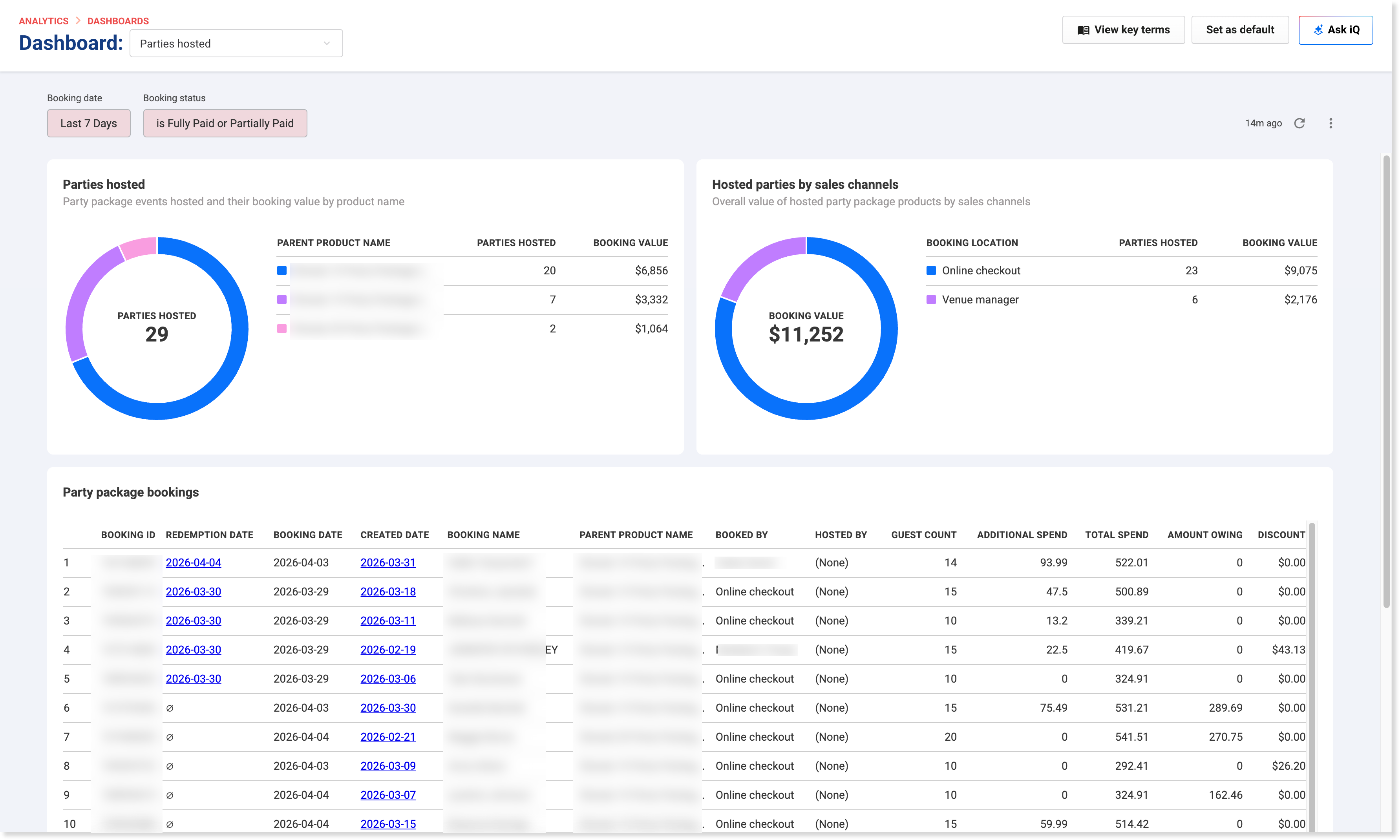
This dashboard uses the Booking date (date the booking was created or purchase date) and Booking status filters shown at the top of the page. In the example shown, the default filters are Last 7 Days and is Fully Paid or Partially Paid.
Metrics and fields
Metric or field | Definition |
|---|---|
Parties hosted | A chart showing party package events hosted and their booking value by product name. |
Hosted parties by sales channels | A chart showing the overall value of hosted party package products by sales channel. |
Booking ID | The ID for the booking. |
Redemption date | The date the party package booking was redeemed or hosted. |
Booking date | The date the booking was made. |
Created date | The date the booking record was created. |
Booking name | The name attached to the booking. |
Parent product name | The party package product linked to the hosted booking. |
Booked by | Shows where or by whom the booking was made, such as online checkout or a named person. |
Hosted by | Shows the staff member assigned to host the party booking. If no staff member is assigned, this field may display “(None)”. |
Guest count | The number of guests included in the hosted booking. |
Additional spend | The amount spent on items outside of the party package, but included in the same booking (eg upsell items or additional products added to the booking). |
Total spend | The total amount spent on the booking. |
Amount owing | The remaining balance that has not yet been paid. |
Discount | The total discount applied to the booking. |
Filter the dashboard
Use the filters at the top of the dashboard to refine the hosted party data you want to review.
Use the Booking date (purchase date) filter to change the timeframe.
Use the Booking status filter to narrow the results by payment status.
Select the refresh icon if needed to reload the results.
The charts and booking table update based on the filters you apply.
FAQs
What does “parties hosted” mean?
Parties hosted are party bookings where the event has already happened. This dashboard shows past events so you can review performance, revenue and booking details.
Why is “Hosted by” blank?
The host may not be assigned to the booking.
The booking may not support host assignment.
What does the “Booked by” field show?
The Booked by field shows how or by whom the booking was made. It can show a named person for POS bookings or “Online checkout”.
What’s the difference between parties hosted and parties booked dashboards?
Parties hosted = events that have already taken place.
Parties booked = upcoming or recently created bookings.