This guide will give you an overview of what each membership status means for your membership programs created using the membership product type in ROLLER and membership expiry dates.
Membership status
Membership statuses in ROLLER are categorized using the groupings listed in the table below. You'll see these categories from status filters in membership reports.
Category | Status | Description |
|---|---|---|
Active | Current | Membership is current |
Active | Pending activation | Membership will become current on a future date |
Active | Pending cancellation | Membership will be canceled at the end of the billing period |
Suspended | Declined payment | Recurring payment attempts have failed |
Canceled | Pending cancellation | Scheduled for cancellation at a future date, but is currently still active |
Canceled | Terminated | Member has canceled their membership |
Canceled | Upgraded | Membership has been upgraded to another membership of higher value |
Canceled | Expired | Membership expiry date has passed |
Canceled | Renewed | Membership has been renewed and a new billing cycle started |
Paused | Pending pause | Pause is scheduled but hasn't started yet. The member can still redeem all their benefits as normal. |
Paused | Paused | Membership is paused. Billing is on hold and membership benefits unavailable until resumed. |
Membership expiry dates
A membership's expiry date is related to the booking end date.
For fixed-cost memberships, the booking end date is based on the product setup. To change the end date of a fixed-cost membership, see below.
For recurring-payment memberships with a limited time period (ie recurring for 3 months only):
If the setting Memberships expire after completion of billing period is set to off, the booking end date is based on the product setup and does not change based on successful payments. If the booking end date is less than the end of the billing period, the end date is the date of the last bill.
If the setting Memberships expire after completion of billing period is set to on, the booking end date is set to what would be the date of the last bill + 1 billing period.
For example, if a membership is set to 6-monthly payments, the booking end date is after 6 months. If the membership ends up in a state where there are more payments needed to be done beyond the expiry date (due to a multi-month suspension), then the membership will still expire on the booking end date and the recurring payment will finish without the final count of payments completed.
For indefinite-billing memberships, they will never go to an expired status regardless of booking end date. If the booking end date is less than 2 billing periods away, upon successful payment, the booking end date is set to another 2 billing periods away.
To learn more about configuring expiry and end dates, see the guide Create your recurring or fixed-price membership products.
If membership has been upgraded from a non-membership product (ie session pass or standard pass), it will be treated as a new member, not a membership upgrade.
Change the expiry date for a fixed-term membership
To change the expiry date of a fixed-term membership:
From Venue Manager, search for and select the booking.
Select the Order tab.
Select the calendar icon next to the membership line item.
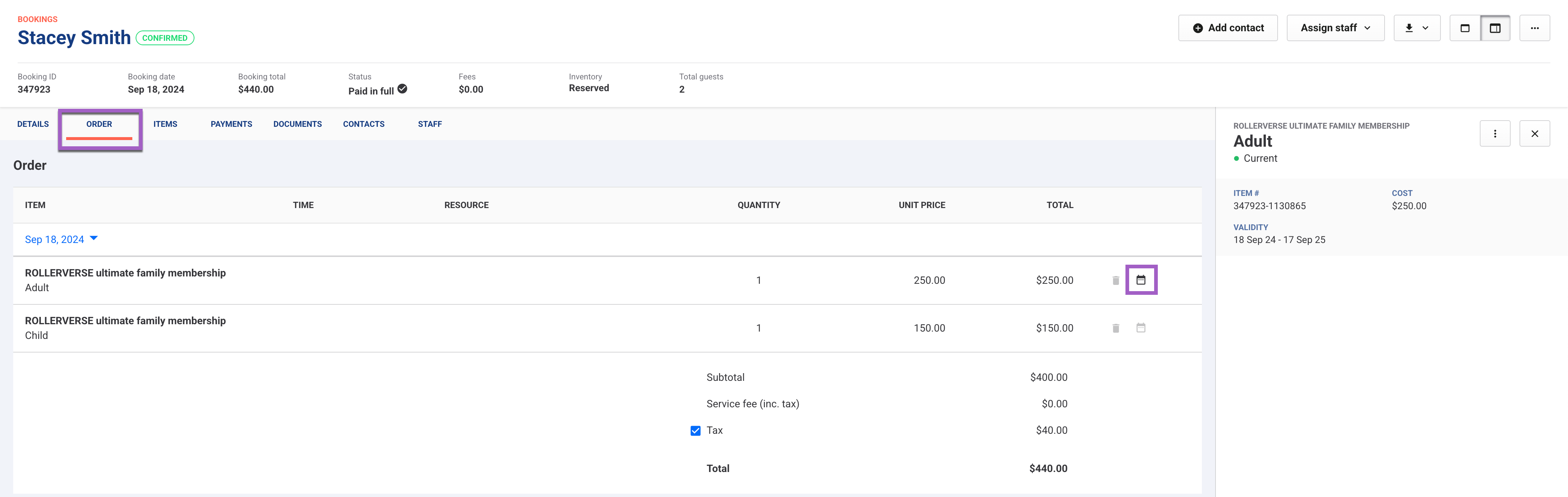
Select the new expiry date.
Check the Items tab to confirm the new validity.
Learn more
To configure membership products and options for cancellations, upgrades, and renewal emails, see the guide Create your recurring or fixed-price membership products
To explore the emails ROLLER sends for managing memberships, see the guide Guest email templates.
To access reports for managing memberships, see the guide Membership reports.