Keep more members with new pause and cancellation-rescue options, turn on payment methods yourself in Venue Manager and find answers faster in the redesigned Help Center. July also brings a session times checkout widget, stock wastage recording and reporting, loyalty enrollment built into your online waiver flow, and a batch of API improvements.
Try out new features in your playground venue about a week before they go live — see below for what's available. Not sure how to access playground? The ROLLER Playground guide shows you how.
This page covers new and improved features with setup guidance, and goes live about a week before the full release. For the complete picture — every change, fix and behind-the-scenes improvement this month — see the release notes, published shortly after release day.
We're always learning from venues like yours. Join our research panel to get early insights into new features and share your feedback to guide future improvements.
Find answers faster in the redesigned ROLLER Help Center
We've redesigned the Help Center to help you find answers faster.
Ask a question, get an answer. AI-powered search answers your questions directly from the search bar, so you don't have to hunt through articles.
Get the key points fast. Article summaries give you the gist at a glance.
Browse by what you're doing. Articles are organized by product area, such as Pricing & Promotions, Bookings & Capacity and Reporting & Analytics, so help is grouped the way you run your venue.
Stay across product updates. The latest releases, updates and changelogs are right on the homepage.
Get help fast. Chat and support requests are one click from any page.
Coming soon: French language support.
Your existing bookmarks and saved links redirect automatically to their new home.
Online checkouts and tickets
Prevent duplicate add-on suggestions in checkout
Plan: All
Preview release (Playground): Yes
Target release: 21 July 2026 (AET)
Previously, if the same add-on was linked to multiple products, guests who added several of those products to their cart saw that add-on suggested multiple times.
Now, you can configure each add-on to appear only once per day across the online checkout, no matter how many products in the cart share it.
To configure this, select Show add-on once per day in the add-on checkout settings.
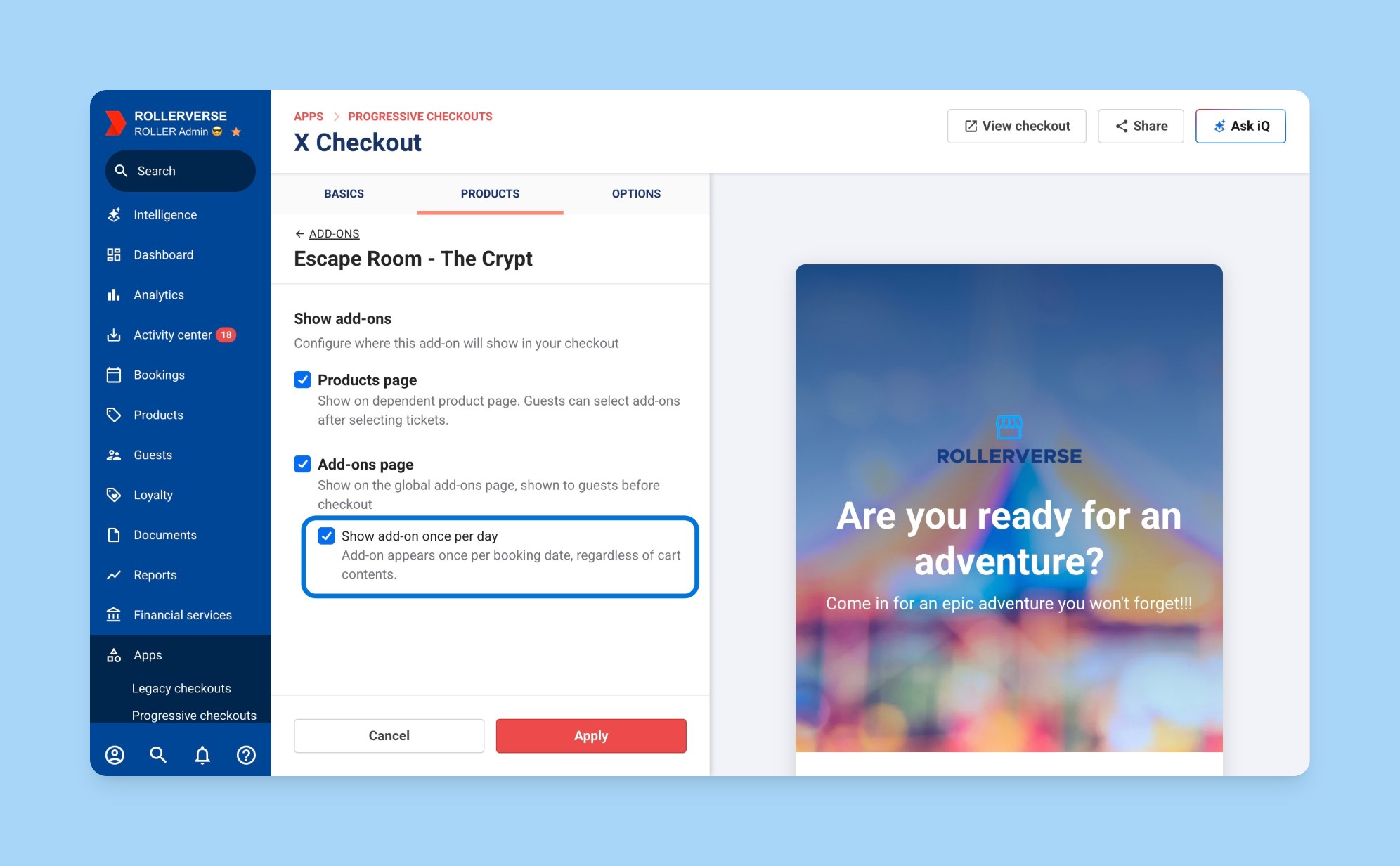
Watch the set-up process in action in the interactive demo below.
Learn more in the guide Limit add-on suggestions to once per day in checkout.
Show sessions by availability using a new session times checkout widget
Plan: All
Preview release (Playground): Yes
Target release: 21 July 2026 (AET)
Venues selling similar session-based products, like escape rooms or VR rooms, can now add a new session availability panel on the checkout homepage.
This panel shows several products and their available times together, so guests can compare availability without clicking into each product separately. Times display up to 6 by default, with the option to expand to show more times. The widget respects each product's existing price rules and sold-out settings. Choosing a time slot goes to that product with the slot pre-selected for the guest to complete the booking.
By default, selecting a different date on the homepage takes guests to the product page. Venues can configure the date selector to keep guests on the homepage instead, which is recommended if you’re using the new widget. This is not supported with overlay checkouts. To enable this feature, contact your customer success manager or the support team.
To set up this checkout widget, do this in your checkout settings.
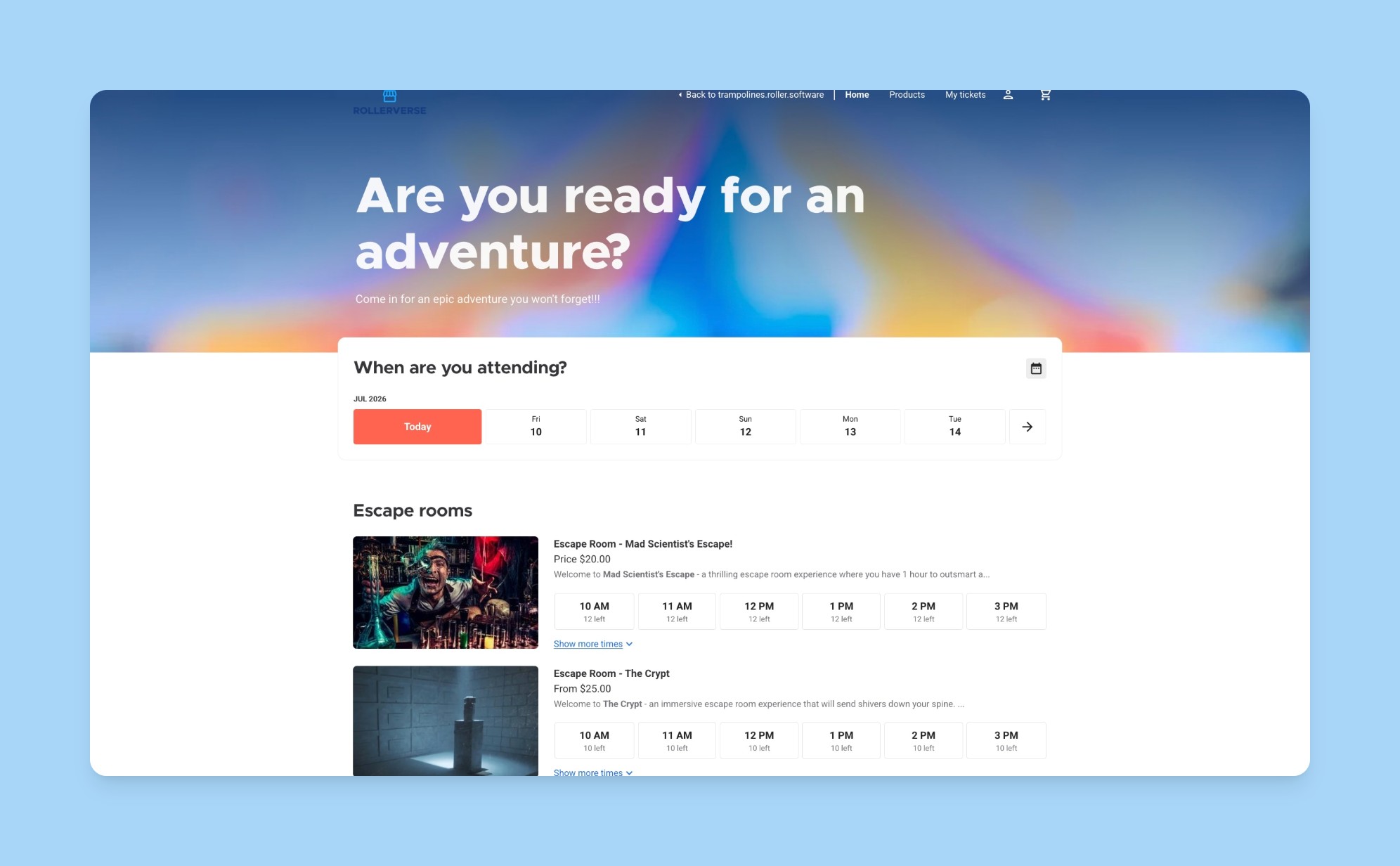
Watch the set-up process in action in the interactive demo below.
Learn more in the guide Show a session availability panel on your checkout homepage (by request).
Venue name now shows in overlay checkouts
Plan: All
Preview release (Playground): Yes
Target release: 21 July 2026 (AET)
Venues with multiple locations can now help guests confirm at a glance which venue they're booking in the overlay checkout. A Booking for [venue name] label sits at the top of checkout overlay, which stays visible as guests scroll. This helps to prevent guests booking at the wrong venue by mistake.
There's no setup required and this rolls out to all venues using overlay checkouts.
Food & beverage
Improvements to stock types for enhanced reporting
Plan: All
Preview release (Playground): Yes
Target release: Live
As part of our latest batch of enhancements improving ROLLER's food and beverage experience, more options have been added as stock types so you can get more out of the new Stock Sales report.
In the stock product settings, use the drop-down to add the correct type to stock products. These types flow through to the Stock sales report so that you can compare the performance of their stock items, and now compare between stock types. Anything not specified shows as the type Untagged.
.png)
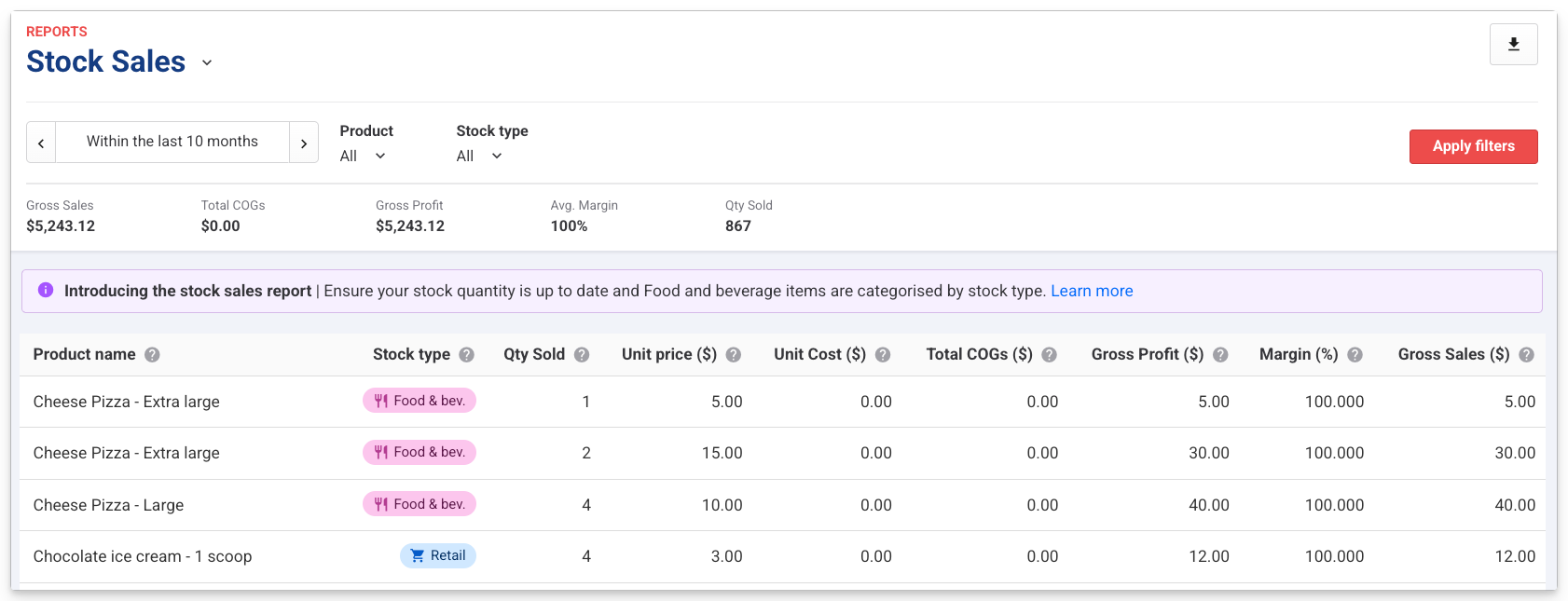
Learn how to update the stock product types in the guide Create stock products. Discover how to report on stock products in the guide Stock Sales report.
Record and report on stock wastage
Plan: Premium and above
Preview release (Playground): Yes
Target release: 21 July 2026 (AET)
Venues selling food and beverage can now record wastage spoilage, breakage, staff comps, expiry with a reason and quantity, from either POS or Venue Manager, and report on this in the new Wastage overview report in Venue Manager.
In POS, staff with the required permission can use the Record wastage button to record wastage and select a reason. This setting is not available for items with zero or unlimited quantity on hand. In Venue Manager, you can record wastage in the overflow menu on the Stock items page.
Requires the Can record wastage in POS permission to record wastage in POS, otherwise a Manager PIN is required. This is not enabled for the POS operator role by default, but can be added to custom roles if needed. Manager and administrator system roles have this permission by default.
The new Wastage report shows product, quantity, stock type, staff member, date and total wastage cost all grouped by reason by default, with drag-and-drop regrouping. It contains aggregates for total cost, total quantity, top reason and top item.
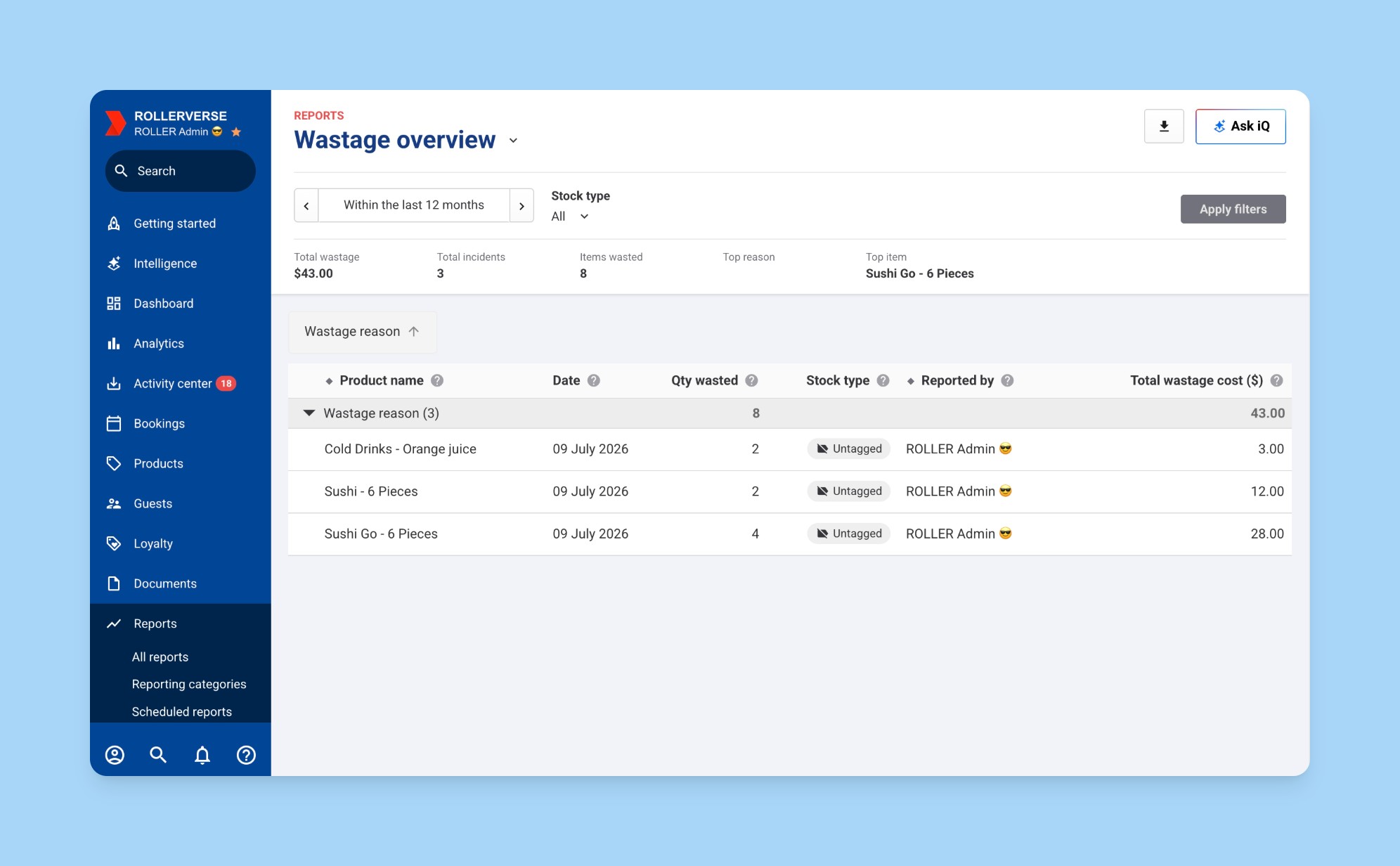
Watch the process in this interactive demo below, to see how to record wastage in POS and Venue Manager.
Learn more about recording and reporting on wastage in the guides Record and report on stock wastage and Wastage overview report.
Memberships
Options to boost membership retention are now available for all venues
Plan: Pro and above
Preview release (Playground): Yes
Target release: 21 July 2026 (AET)
Keeping members is now easier with a suite of new options designed to boost membership retention.
There are many and varied reasons why a member might consider cancelling their membership. Cost, injury, illness, or that a member simply wants to step away for a short time. Giving members a way to pause, or switch to a plan that better suits them (with an optional discount on the new plan), instead of cancelling outright might keep them coming back to your venue. Staff can schedule pauses from Venue Manager, or members can self-serve a pause. If a member initiates a cancellation online, venues can configure cancellation-rescue offers to show to that member before they go. These tools are designed to reduce member churn by providing options other than cancelling a membership.
A venue can decide to implement some, or all of the retention options to increase the likelihood that a guest remains a member for longer. The options are:
Pause a guest's membership in Venue Manager: if a member is unable to use their membership for any reason like injury, or illness venue staff schedule a membership on pause for an agreed duration for them. The pause will commence after the current billing cycle is complete. Pausing a membership in Venue Manager is available on all plans.
Allow a guest to pause their membership in online accounts: choose to allow guests to have a pause option in their online account that puts their billing on hold. You can set the maximum total pause duration allowed within a 12-month period, and as soon as the pause is up, their billing automatically resumes.
Provide cancellation rescue offers: if a member selects to cancel their membership in their online account, before they finalise the cancellation certain options can be shown to them. A venue can decide what options are displayed: pausing their membership or switching to an alternative plan (with or without an additional discount).
Allowing members to self service a membership pause and cancelation in online accounts is a feature available only to customers on Pro and above. Learn more about how to pause memberships in the guide Pause memberships to boost member retention. To configure cancelation rescue options to show to guests after they attempt to cancel in their online account see the guide: Offer membership cancelation rescue options to prevent churn.
Membership options for families and groups are now available for all venues
Plan: Premium and above
Preview release (Playground): Yes
Target release: 21 July 2026 (AET)
Venues can sell memberships that cover a whole group. This might be families, friends or corporate groups, covered in a single membership product. Primary members are permanent; additional members can be added or removed by the membership holder (from their online account) or by staff at POS, with billing automatically updating for any changes.
Previously this feature was in in beta, but now it's available for all venues.
Learn more about how to set up a group membership in the guide Create a group membership product.
Loyalty program
Grow loyalty enrollment through your online waiver flow (early access)
Plan: Loyalty add-on
Preview release (Playground): No
Target release: Live now
Every guest who signs an online waiver is now an enrollment opportunity. When your venue has loyalty activated and waivers enabled, guests who buy a product with waiver requirements are prompted to join your loyalty program right after signing, with a single Join loyalty selection. No separate sign-up step, no staff effort.
This works wherever guests sign, including guests who sign their waivers during online checkout, and those who sign via the online waiver link, either in venue or via email/text.
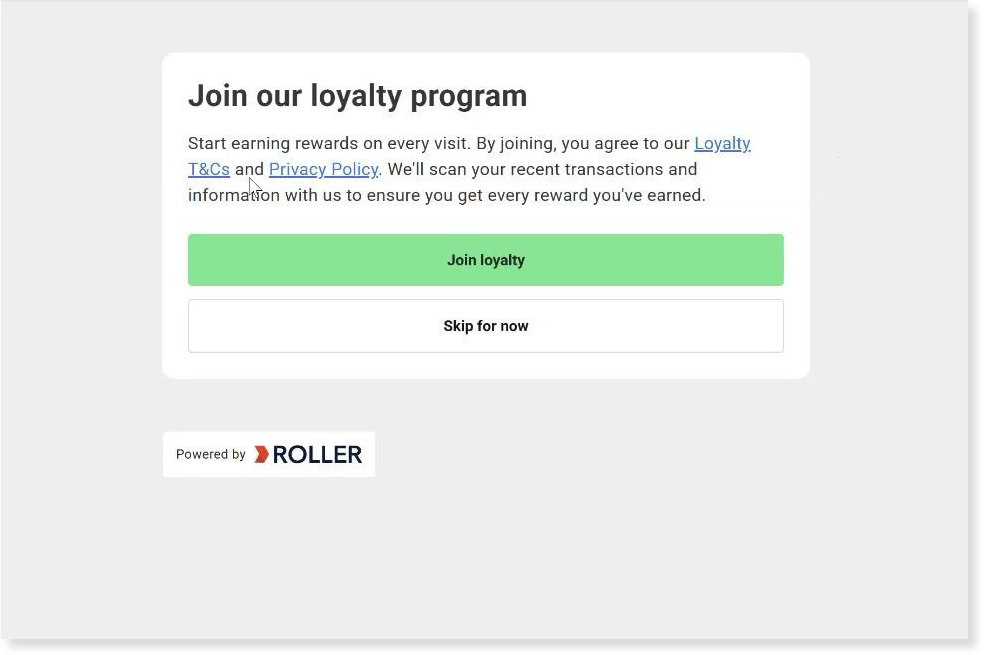
Guests who select Skip for now aren't lost. If they have subscribed to your mailing list, they're still invited by email so they can join later.
The Join loyalty prompt appears after signing in both the online checkout and online waiver link flows. After selecting Join loyalty, online checkout guests continue to the checkout's booking confirmation page, while online waiver link guests see the waiver complete page.
The online checkout's booking confirmation page confirms eligible products will count toward the guest's loyalty progress when they attend.
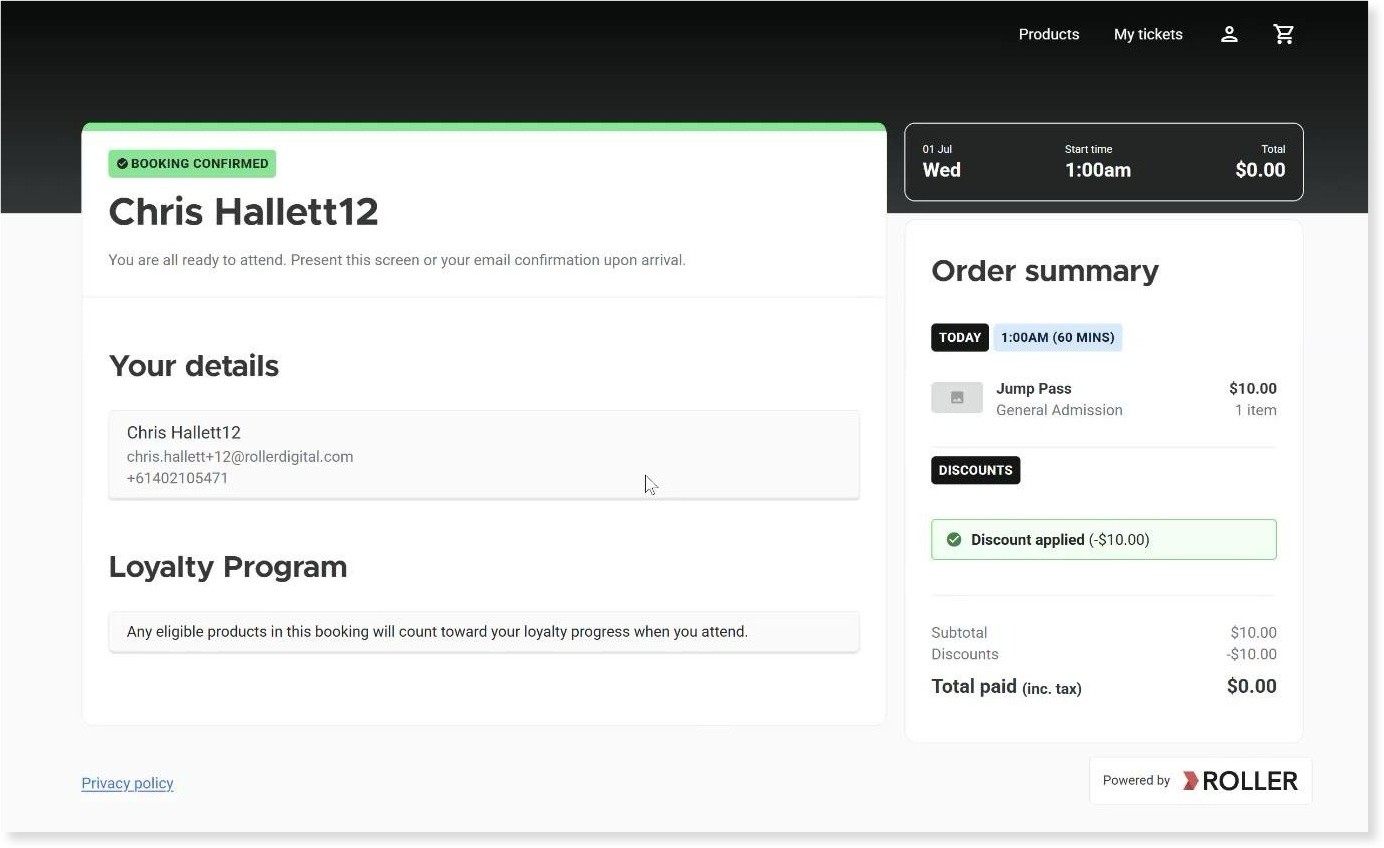
To learn more, see the guide How guests join your loyalty program (early access).
Party packages
Apply purchase limits to party packages
Plan: All plans
Preview release (Playground): Yes
Target release: 21 July 2026 (AET)
Venues can now apply minimum and maximum purchase limits to party packages across all ticket variations combined, rather than per variation. For example, with adult and child ticket variations, you can set a maximum purchase limit of 10 tickets across both — so guests can book 4 adults and 6 children, or any other combination of variations, as long as the total stays within the limit.

To learn more, see our guide on purchase limits.
Print wristbands and stickers for party packages
Plan: All
Preview release: No
Target release: 21 July 2026 (AET)
Wristband and sticker printing are now available for party packages. Previously, both were supported for session passes only.
Wristbands automatically print when a guest is checked in at the POS and their session end time matches a configured printer. Multiple printers can be set up for different session end times, all configured centrally in Venue Manager via Settings > Printers.
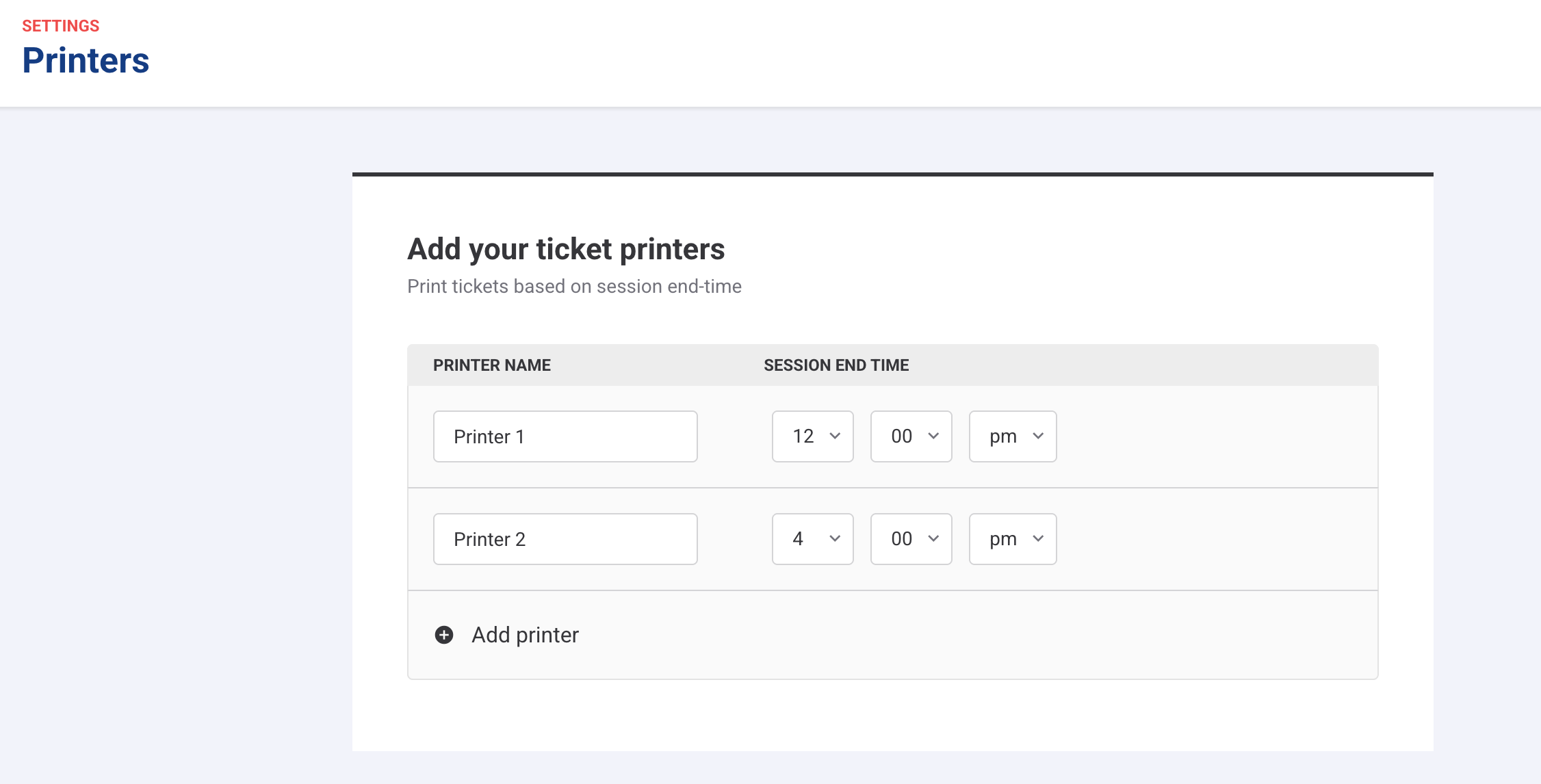
Stickers are printed via sticker printers connected to a POS device. Each POS device is linked to one sticker printer, which is set up as an Alternate ticket printer via More > Settings > Hardware.
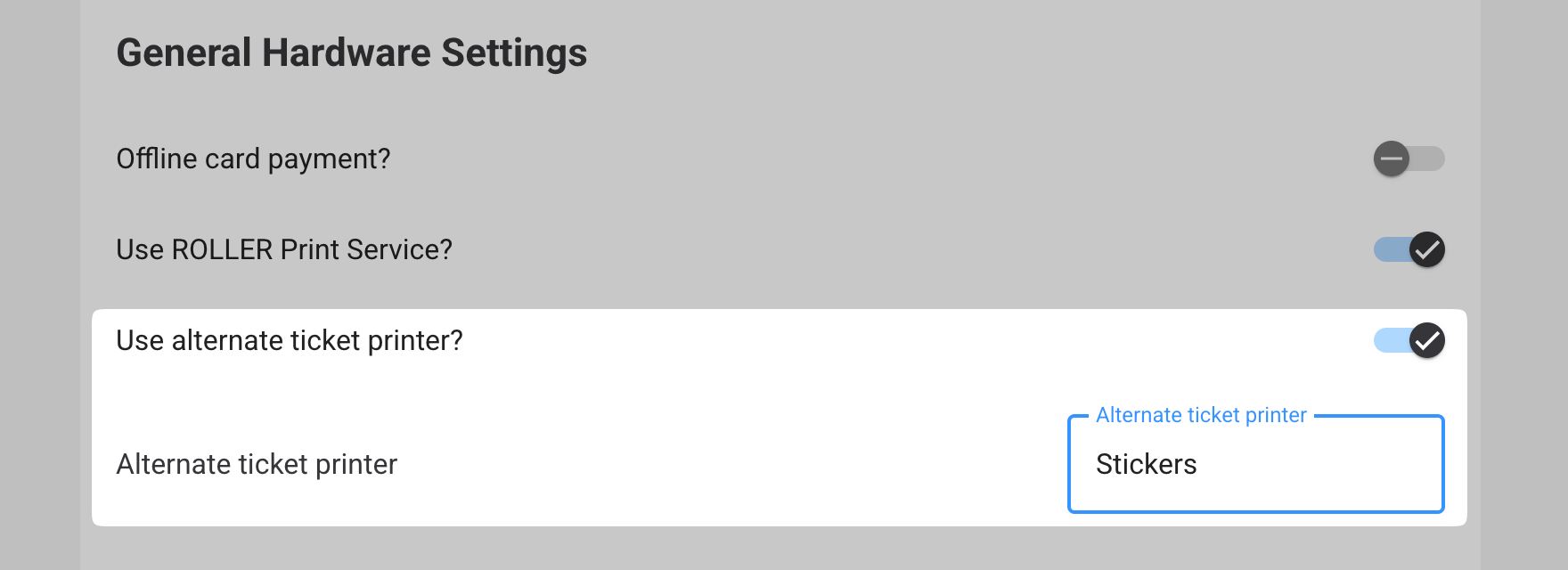
To enable either option for a party package, open the product and scroll to Additional options > Alternative printer. Two checkboxes will appear:
This product uses alternate ticket printer: enables sticker printing
This product uses ticket printers based on session time: enables wristband printing

Both can be enabled on the same product.
To learn more, see the guides on wristband printing and sticker printing.
Reporting and analytics
Measure your Google Things to do performance in the Bookings report
Plan: All plans
Preview release (Playground): Yes
Target release: 21 July 2026 (AET)
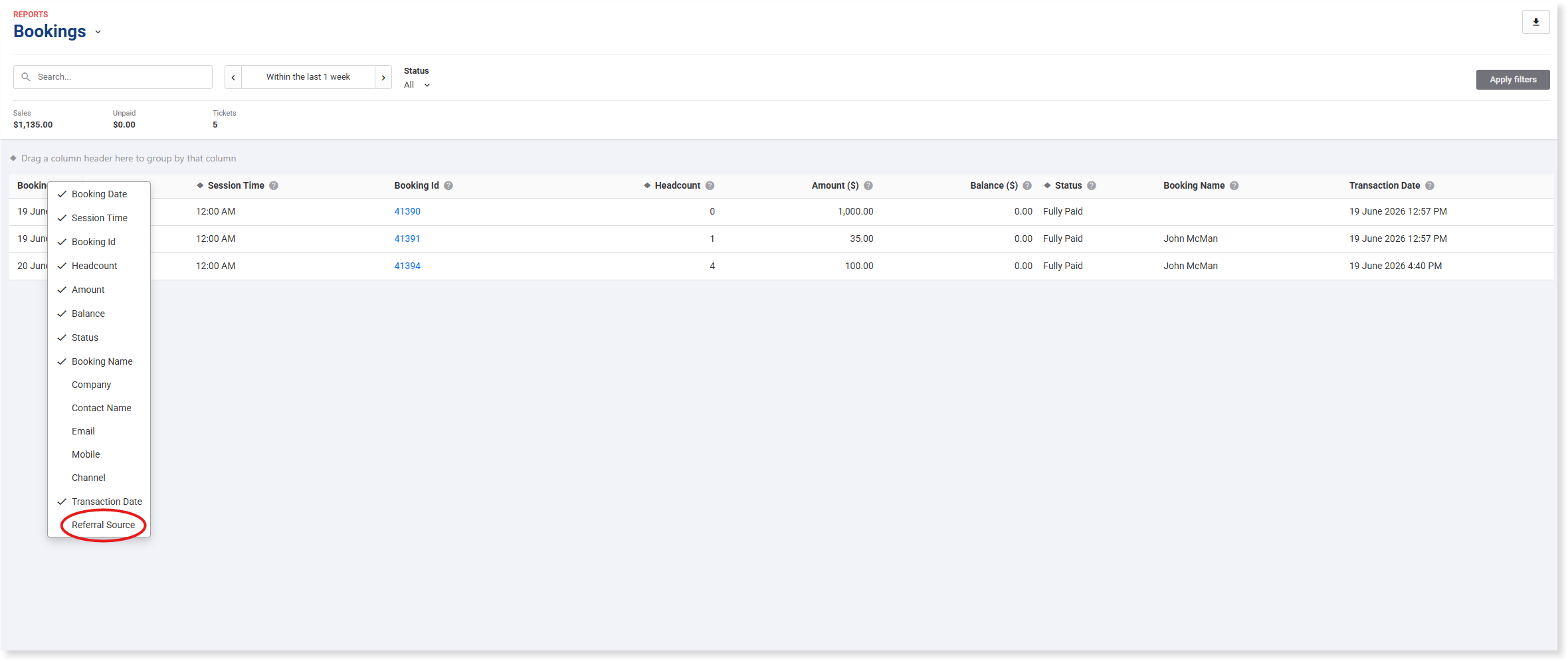
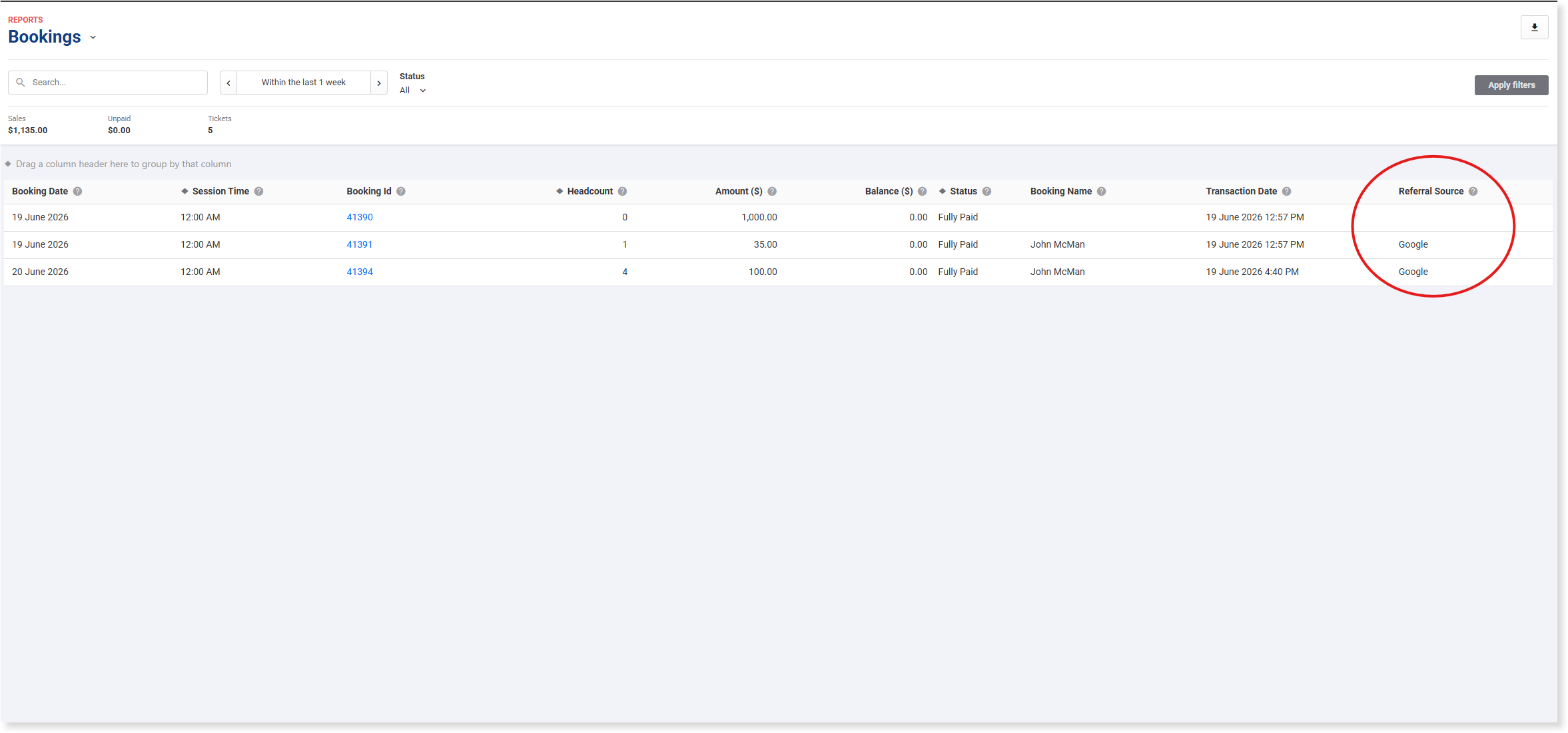
See how many bookings Google Things to do brings in, directly in the Bookings report. Add the Referral Source column and any booking that came through Google Things to do is labeled Google.
From Venue Manager, go to Reports > All reports > Bookings report.
Right-click the report grid and select Referral Source to add the column.
Any booking sourced from Google Things to do is labeled Google, so you can see your Google bookings next to everything else your team already tracks.
Choose when booking and transaction fees are recognized in revenue reporting
Plan: All
Preview release: Yes
Target release: 21 July 2026 (AET)
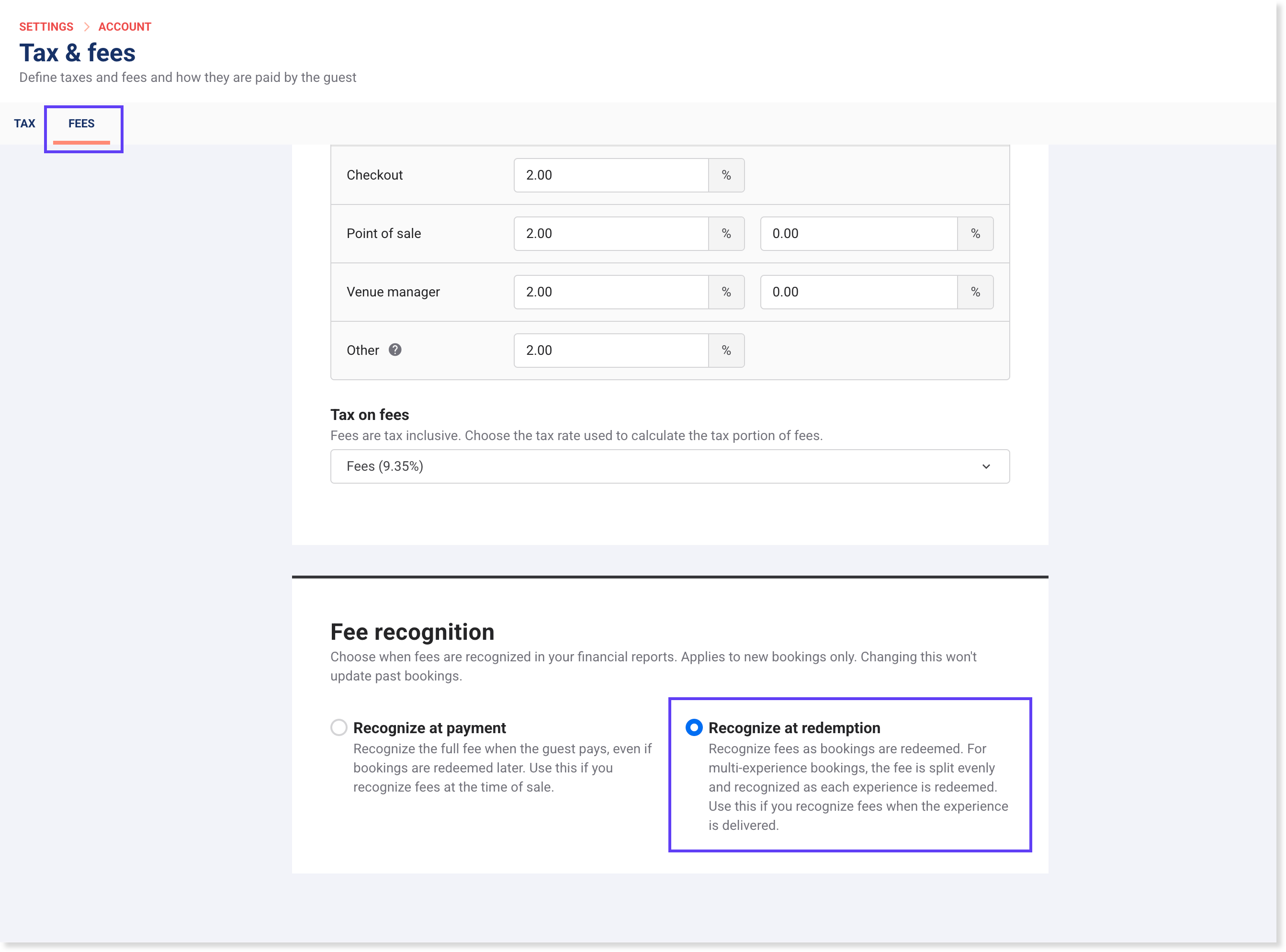
If your venue uses accrual accounting, you can now choose when booking and transaction fees are recognized in your revenue reports. This feature is now generally available. A new setting on the Tax & fees page (Fees tab) lets you defer fee recognition until the booking is redeemed, so fee revenue aligns with when the service is delivered rather than when payment is received.
When enabled, fee revenue from new bookings is recorded as deferred revenue until the booking is redeemed or expires. For multi-experience bookings, the fee is split equally across experiences and recognized as each one is redeemed. This applies to new bookings only. Fees already recognized on existing bookings are not affected and won't change. Gift card fees are excluded.
The Trial Balance report now includes a separate row for deferred fee revenue, and the Revenue Recognition report includes a new Deferred fee revenue column.
To change the setting, go to Settings > Account > Tax & fees > Fees tab in Venue Manager.
The staff permission Can edit fee recognition is required for staff to change fee recognition settings.
Multi-venue
Set up guest segments at HQ
Plan: Pro and above
Preview release: No
Target release: 21 July 2026 (AET)
HQ guest segments are coming out of beta. You can now set up segments centrally at HQ and have them automatically published to every managed venue in your group.
When you save a segment at HQ, it's pushed to your managed venues with an HQ tag, so venue staff can see which segments are managed centrally. ROLLER automatically maps existing guests at each managed venue to the new segment.
The staff permissions Can manage HQ guest segments and Can access segment settings are required.
To get started:
From Venue Manager at your HQ, go to Guest > Segmentation > Segments.
Select Create segment, or open an existing segment to edit.
Define your segment criteria (eg lifetime spend, visit frequency).
Select Save. The segment is pushed automatically to your managed venues with an HQ tag.
To learn more, see the guide Set up guest segments at HQ.
ROLLER iQ
iQ mobile dashboard: From snapshot to deep dive in a single tap (early access)
Plan: All
Preview release (Playground): No
Target release: 21 July 2026 (AET)
Never miss a beat on your venue's performance, ROLLER iQ now opens on mobile with a live dashboard showing you key metrics like revenue and bookings, so you can see at a glance how your venue's tracking week on week.
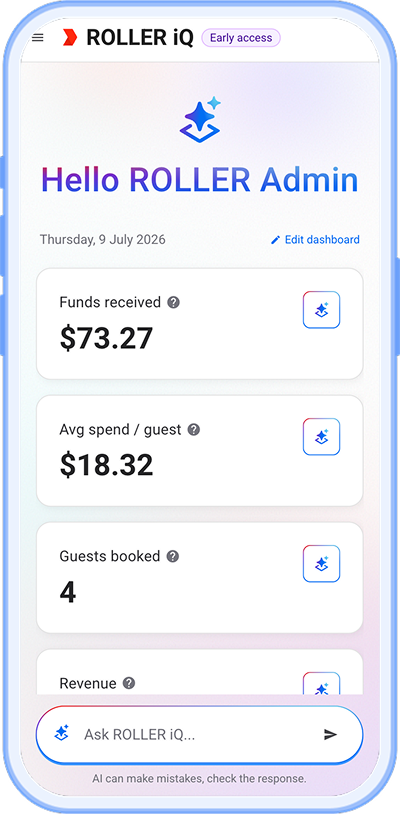
Every operator's priorities are different, which is why you can customize your iQ mobile dashboard by selecting the metrics that matter most to you, so your daily view is always relevant to how you run your venue. Select any metric to instantly launch an iQ conversation that digs deeper into the numbers, turning metrics into actionable insights. It's a fast and convenient way to stay across your venue's performance each day and discover what iQ can do for you.
To learn more about ROLLER iQ mobile dashboard, read the guide Get started with ROLLER iQ.
ROLLER iQ now enabled by default for the Manager role (early access)
Plan: All
Preview release (Playground): No
Target release: 21 July 2026 (AET)
More of your team can now put ROLLER iQ to work, turning metrics into actionable insights. The Can use ROLLER iQ role permission is now switched on by default for the Manager system role, giving managers instant access to iQ-powered insights without needing an administrator to enable it first.
Payments
Self-serve payment methods in Venue Manager
Plan: All
Preview release (Playground): Yes
Target release: 21 July 2026 (AET)
You can now turn on additional payment methods for your venue directly in Venue Manager, no support ticket required.
Choose from a list of payment methods approved for the country you operate in, and turn each one on for online checkout, POS or both. When guests have more payment options at checkout, they're less likely to abandon their cart because their preferred way to pay isn't available.
To get started:
Go to Settings > Account > Payments.
From the dropdown, select the payment method you want to add.
Check the boxes and select if you want the payment method to appear in the online checkout, POS or both.
Select Save.
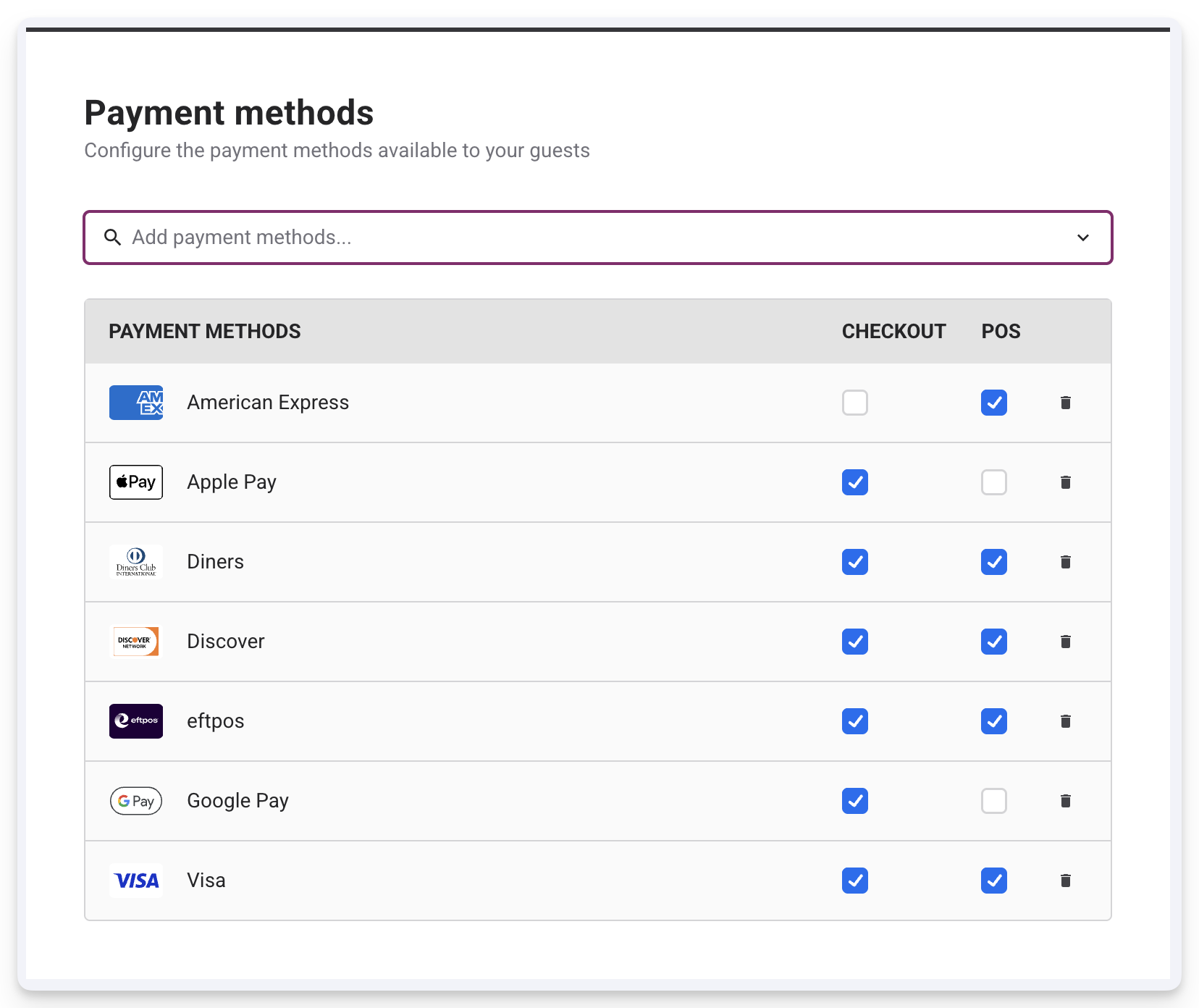
Some payment methods may not be available for both checkout and POS, which means you'll only have the option to turn them on for checkout or POS, not both. To learn more, read the guide Add online payment methods with ROLLER Payments.
API
API access on by default for all Playground venues
Plan: All
Preview release (Playground): Yes
Target release: 21 July 2026 (AET)
All Playground venues now come with API access switched on, so you can begin testing and building with the ROLLER API straight away, no more waiting on a support request to get set up.
Two more improvements come with this update:
Using the Update Playground button no longer resets your API access or removes any API keys you've already created. You won't need to redo your setup every time you refresh your Playground data.
API calls in Playground don't impact your usage limits, so you can test thoroughly before going live. But, this is still a paid add-on if you'd like to use the API in your live environment.
To learn more about ROLLER's API, read the guide API overview and to learn more about ROLLER Playground, read the guide ROLLER Playground.
Control API key access
Plan: All plans with API access
Preview release (Playground): Yes
Target release: 21 July 2026 (AET)
You can now update your API keys and define exactly what they’re allowed to do, rather than giving them access to everything by default. Choose the actions a key can perform and the type of data it can touch, so each key only has the access it needs.
This makes it easier to share a key safely with a partner or agency, keep sensitive data like guest and financial information locked down and stay ahead of privacy requirements like GDPR and CCPA, without slowing down the integrations you rely on.
To get started:
From Venue Manager, go to Settings > Integrations > API Keys.
From the API keys list, select the options menu (three dots) at the end of the row for the API key you wish to update.
Select Update scope from the dropdown.
Select Specific endpoints for either (or both) the REST API and Reporting API. Choose the actions and data types the key needs.
Select Confirm.
To learn more, read the guide API overview.
Create and manage gift cards with the ROLLER API
Plan: All plans with API access
Preview release (Playground): Yes
Target release: 21 July 2026 (AET)
You can now create ROLLER gift cards through the API, so partner platforms can issue gift cards on your behalf without staff creating them one by one. This makes it easier to sell your gift cards through external channels, like corporate resellers or retail partners, while keeping every card fully usable across your existing sales channels: POS, online checkout and Venue Manager.
You can create up to 1,000 gift cards in a single request, assign a custom card number where needed and choose to email cards straight to recipients.
You'll also be able to let partner platforms check gift card balances, take payment with a ROLLER-issued gift card and refund back onto that same card, instead of always issuing a new one. Tips can't be paid for with a gift card, but partner platforms can now log a tip against a booking automatically through the API, just like a staff member would at POS, so that tips aren't lost when a guest closes out a tab and pays with a gift card.
To learn more, read our API documentation Create gift cards and Manage gift cards.
API enhancements: July 2026
Plan: All plans with API access
Preview release (Playground): Yes
Target release: 21 July 2026 (AET)
The following enhancements have been added to the ROLLER API:
Stock product type — When creating, updating or looking up a stock product through the API, you can now tag what type of item it is (food & beverage, retail, miscellaneous or untagged). This helps partner systems sort and handle products correctly without guessing.
Membership pause and cancellation dates — The API can now tell you if a membership is paused, about to be paused or scheduled to be cancelled, and on what dates. This is available both when looking up a booking and via the automatic booking notifications sent to partner systems, so external systems can stay in sync with a member's status without checking Venue Manager by hand.