This feature is currently in beta with a select group of customers. To join the waitlist, contact your customer success manager or support.
Turn funds pending settlement into cash flow on demand, without waiting for the standard settlement cycle, with instant cashout.
Eligible ROLLER Payments customers can cash out funds pending settlement early from Venue Manager, and the money is in your account in minutes. You can cash out any or all funds you have pending settlement, up to a daily limit of AUD$5000. Each request incurs a 1.75% fee (tax inclusive for some regions).
Only the ROLLER admin, account owner or billing contact is able to access instant cashout. You'll need to agree to the terms and conditions before you can make a request.
How it works
When you request a cash out, ROLLER releases the amount you request from your pending settlement funds ahead of the standard payout schedule. A 1.75% fee (tax inclusive) is deducted from the amount you request, and the remaining balance transfers directly to your bank account.
For example, if you request a cashout of $1,000, the fee is $17.50 and the total amount you receive is $982.50 ($1,000 − $17.50).
Eligibility and access
This feature is available to ROLLER Payments customers in the following regions: AU, EEA, US and the UK.
Not all bank accounts support instant cashout. ROLLER will perform a bank account eligibility check for all venues before giving you access to this feature. If your bank account doesn't support instant cashout then you won't see this feature on your ROLLER Payments dashboard.
Only a ROLLER admin, account owner or billing contact is able to access instant cashout.
Each time you request a cashout, a one-time password (OTP) is sent to the email address linked to the account owner so you can verify your identity. If you’re a ROLLER admin or billing contact, you’ll have to ask the account owner for the OTP if you request an instant cashout.
The ROLLER account owner must sign the terms and conditions before they can make an instant cash out request.
Daily limits and fees
You can make as many cash out requests per day as you want, up to a daily limit of AUD$5,000. The daily limit for other currencies are as follows:
EURO: €3000
USD: $3500
GBP: £2500
There is a "cool down" period of 10 minutes after you request a cash out. Once this period has expired you can make another request.
Your pending settlement funds reset after your sales day ends. For most venues it will reset between 12am–2am every morning.
A 1.75% fee (tax inclusive) is deducted from the cashout amount you request. This fee is applied to each individual cashout. For example, if you request a cashout of $1000, the 1.75% fee is $17.50. $1000 - $17.50 = $982.50 deposited in your nominated bank account.
Request an instant cash out
To get started:
From Venue Manager go to Dashboard > Payments.
Select Cashout now.
Verify your identity with a one-time password (OTP) sent to the email address linked to the account owner.
Select the amount you want to cash out from your pending settlement funds (up to a daily limit of AUD$5000).
Review the cashout total, fees and then accept the terms and conditions. You will only have to accept the T&Cs the first time you request an instant cashout.
Then Confirm cashout.
Funds land in your nominated bank account within minutes (less the 1.75% fee).
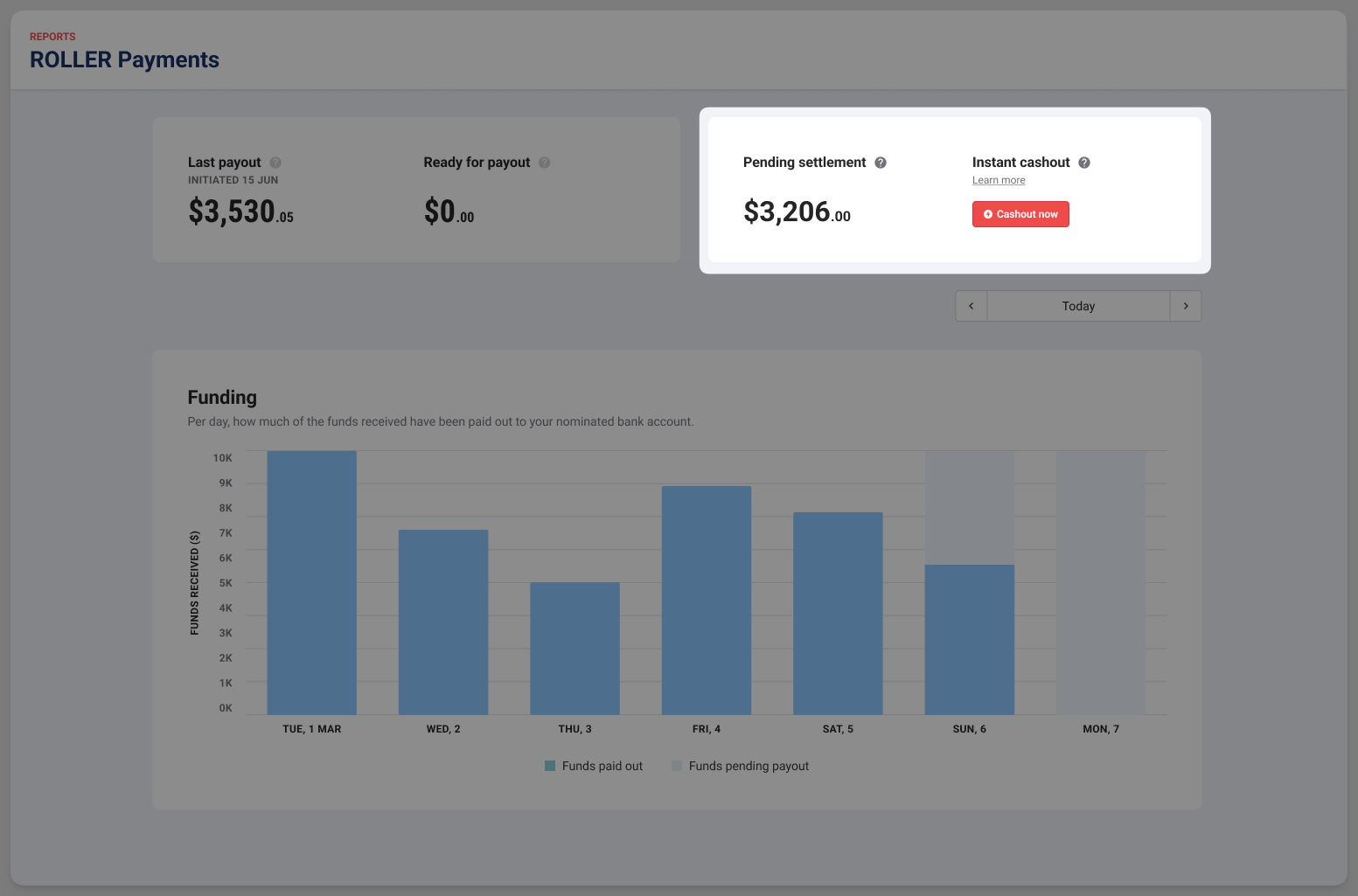
Any pending settlement funds that are left over from that business day will follow the standard payout cycle (deposited to your nominated bank account within 2 business days).
Reporting
When you use instant cashout to access your funds early, ROLLER shows this activity across three reports so you can reconcile your account.
Payout export report
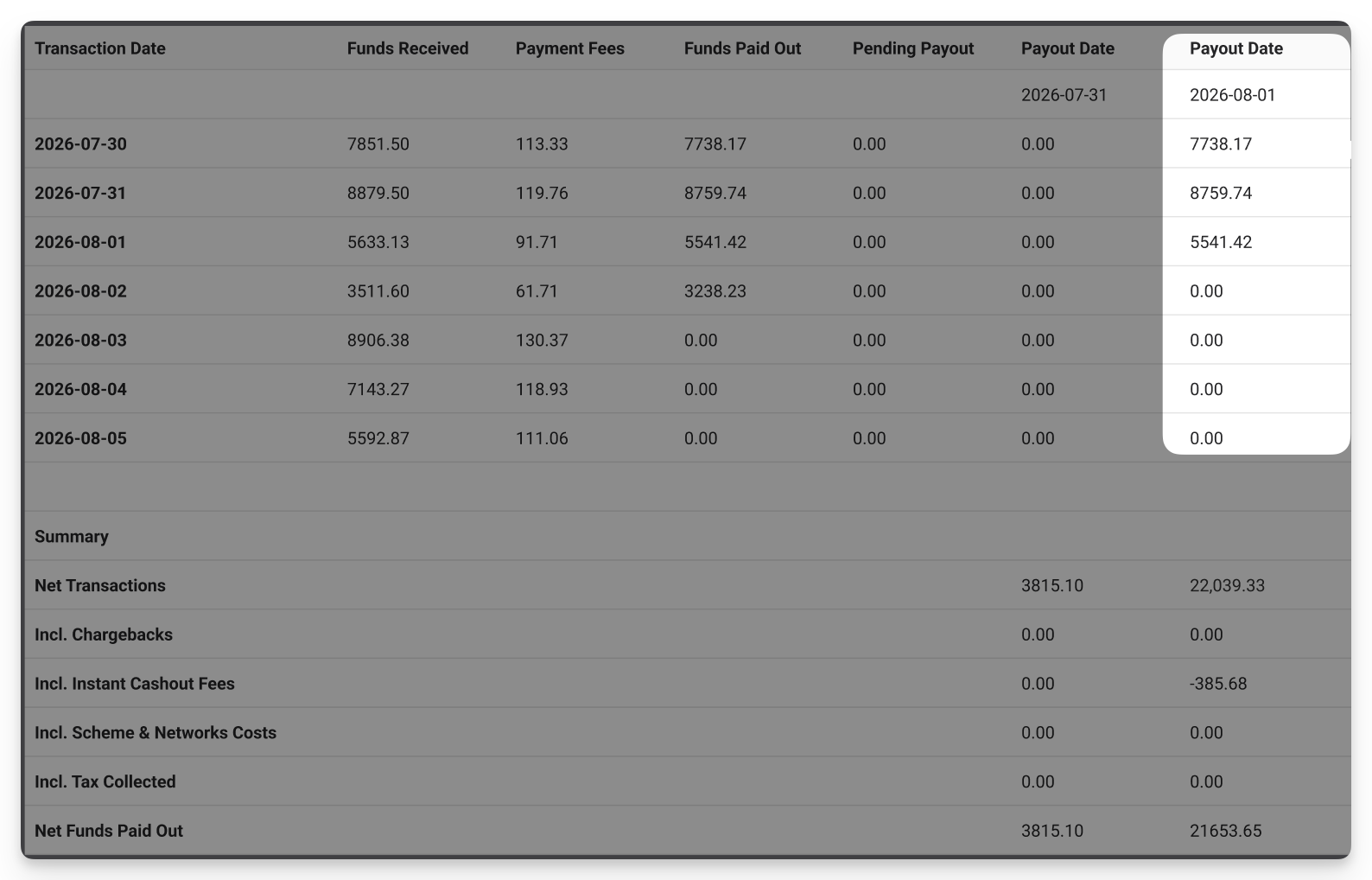
Each instant cashout payout is reflected on the date it was made. For example, if you made an instant cashout on 1 August, then in the report the cashout amount (less fees) is included in the total payout for 1 August.
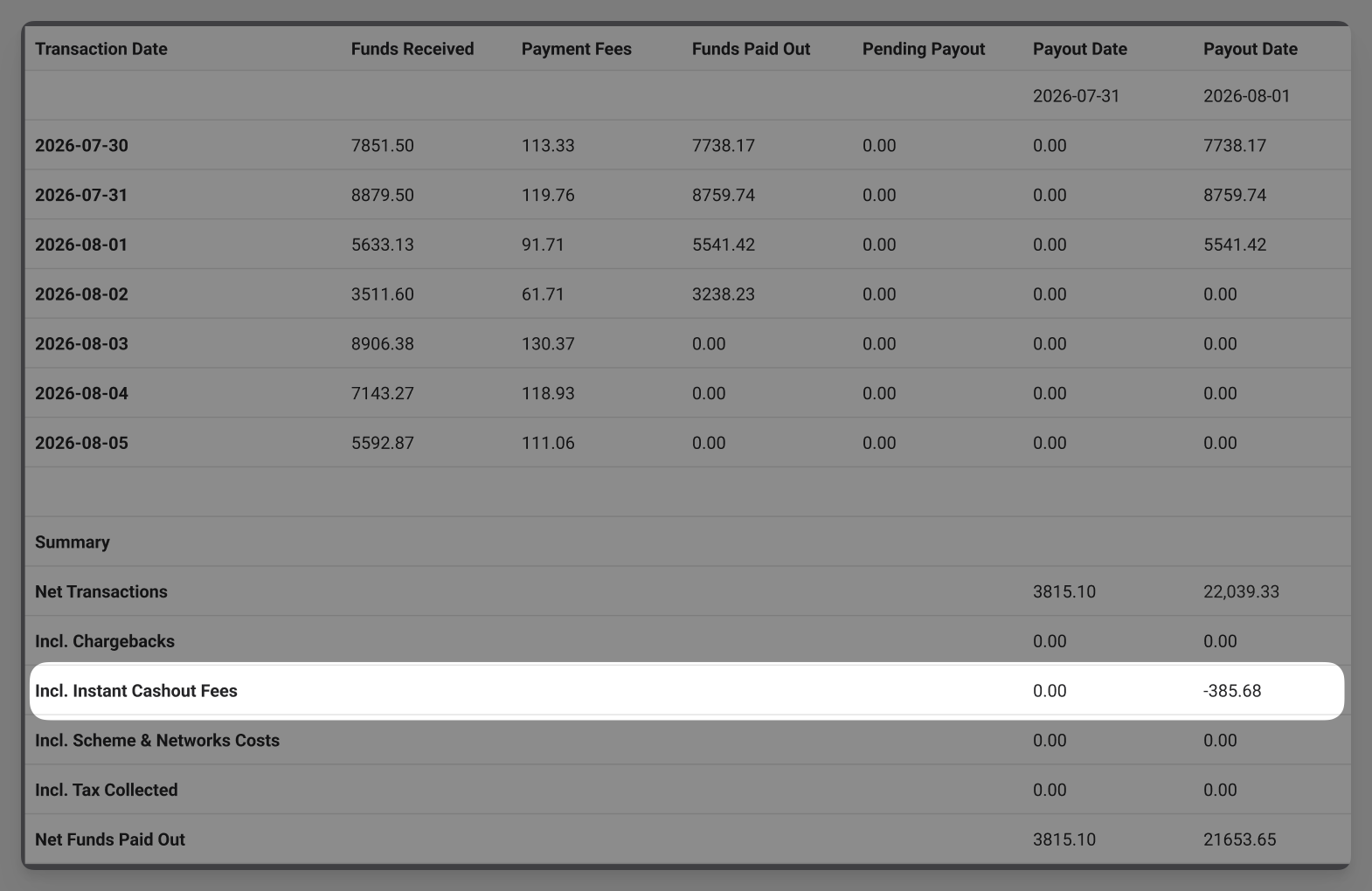
The instant cashout fee appears as a separate line item labeled Incl. Instant Cashout Fees in the summary section of the report.
Monthly merchant statement
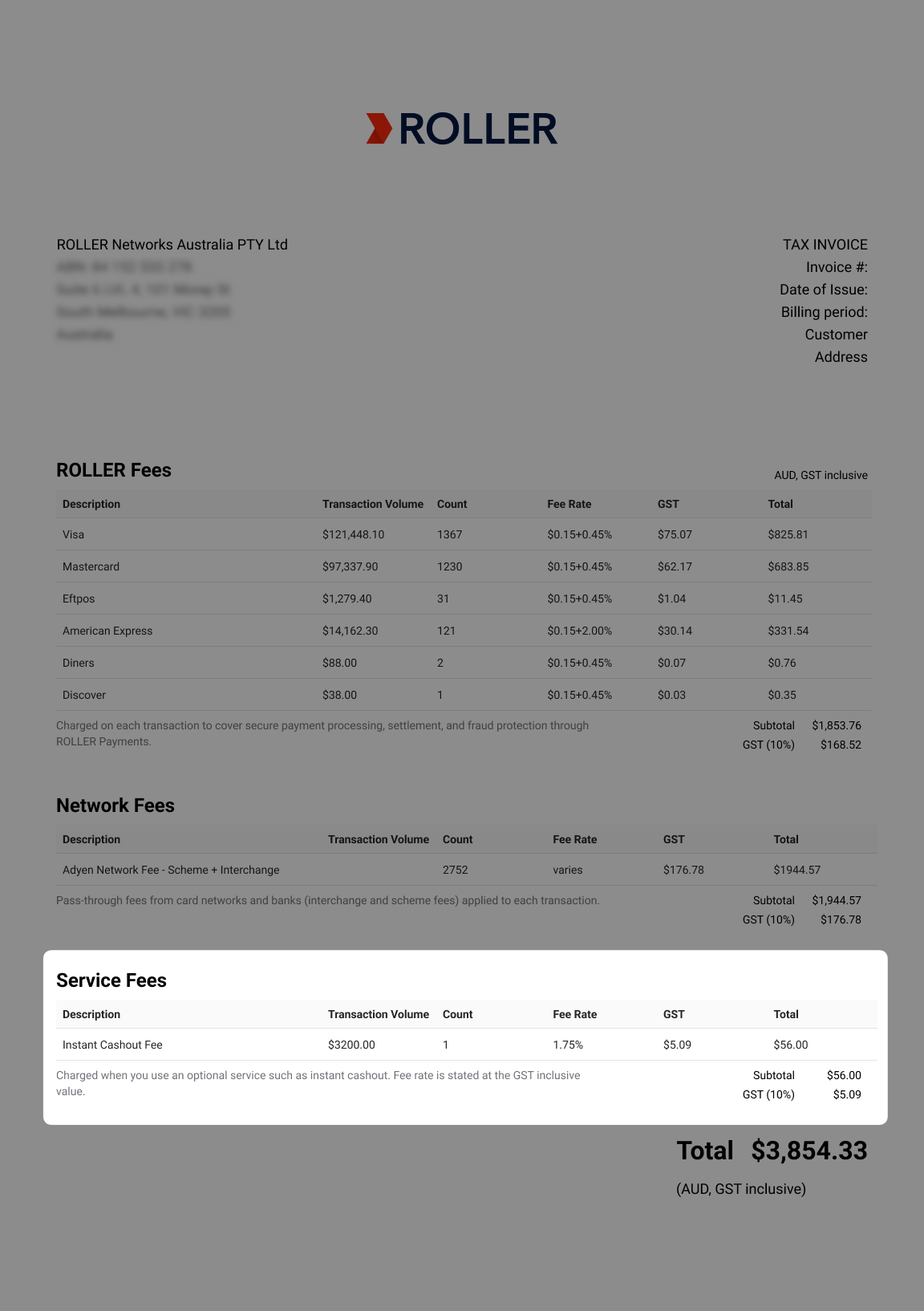
A Service Fees section lists any instant cashout fees charged that month, including applicable tax. You'll also see a corresponding column when downloading this statement from Venue Manager.
ROLLER Payments Transactions report
Two line items appear when you use instant cashout:
Instant cashout: The amount you cashed out early.
Instant cashout fee: The fee charged for that cashout.
To find the details of a specific instant cashout for reconciliation purposes, use this report.
FAQs
How can I get access to this feature?
This feature is currently in beta with a select group of customers. To join the waitlist, contact your customer success manager or support.
Who has access to instant cashout?
ROLLER account owners, billing contacts and administrators all have access to instant cashout. The one time password is sent to the account owner only.
Will this be available to all ROLLER Payments customers in all regions?
No, available regions are AU, EEA, US and the UK.
Will there be a waiting period for new ROLLER Payments customers who want to access this feature?
Yes. All new ROLLER Payments customers will have to wait 30 days before they can access this feature.
How long will it take an instant cashout to reach my bank account?
Payouts can take up to 10 minutes to process and land in your nominated bank account (the bank account your regular payouts are deposited to).
Are there minimum withdrawal amounts?
No.
What is the daily limit in other currencies?
EURO: €3000
USD: $3500
GBP: £2500
Can I request more than one instant cashout per day?
Yes, up to the limit of AUD$5000 per day (inc. fees).
Is there a "cool down" period before I can request another cash out?
Yes, there is a 10-minute cool down period when you won't be able to access the feature (assuming you haven't cashed out the daily maximum already).
When do the pending settlement funds reset each day?
After your sales day ends. For most venues it will reset between 12am–2am every morning.