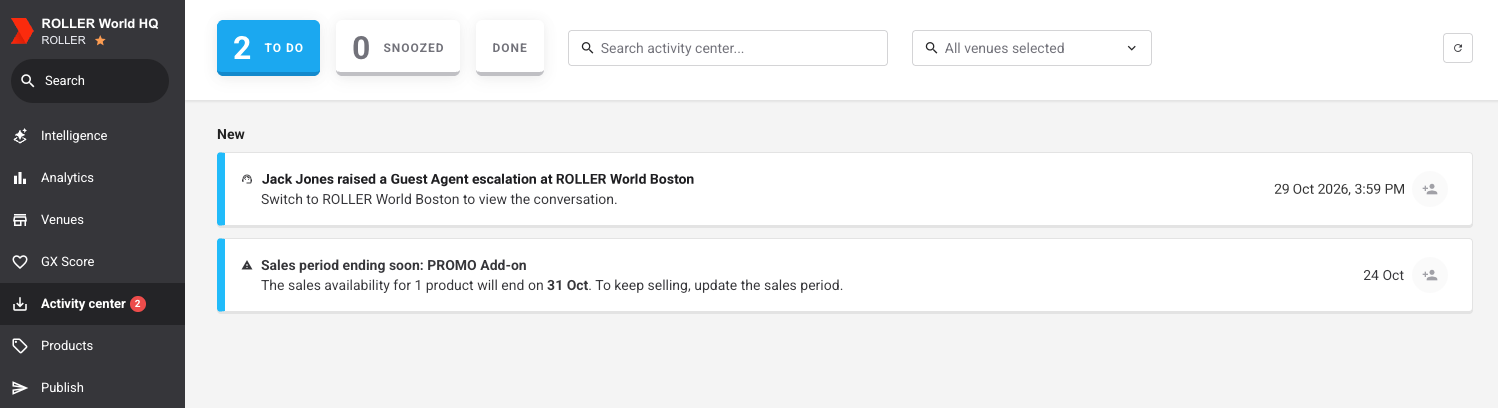
When a guest at any of your managed venues asks Guest Agent for a person, the escalation also lands in your HQ Activity center. A central team can pick it up straight away, without checking each venue's Activity center one by one. Marking an escalation as done at HQ or at the venue marks it done in both places, so two teams don't follow up the same guest.
Register your venue for early access
Guest Agent is in early access for eligible venues, and we're rolling it out in stages. It has usage-based pricing, so you pay based on how much your agent is used.
How HQ escalations work
Each escalation raised at a managed venue reaches two places, so the venue and HQ can both see it.
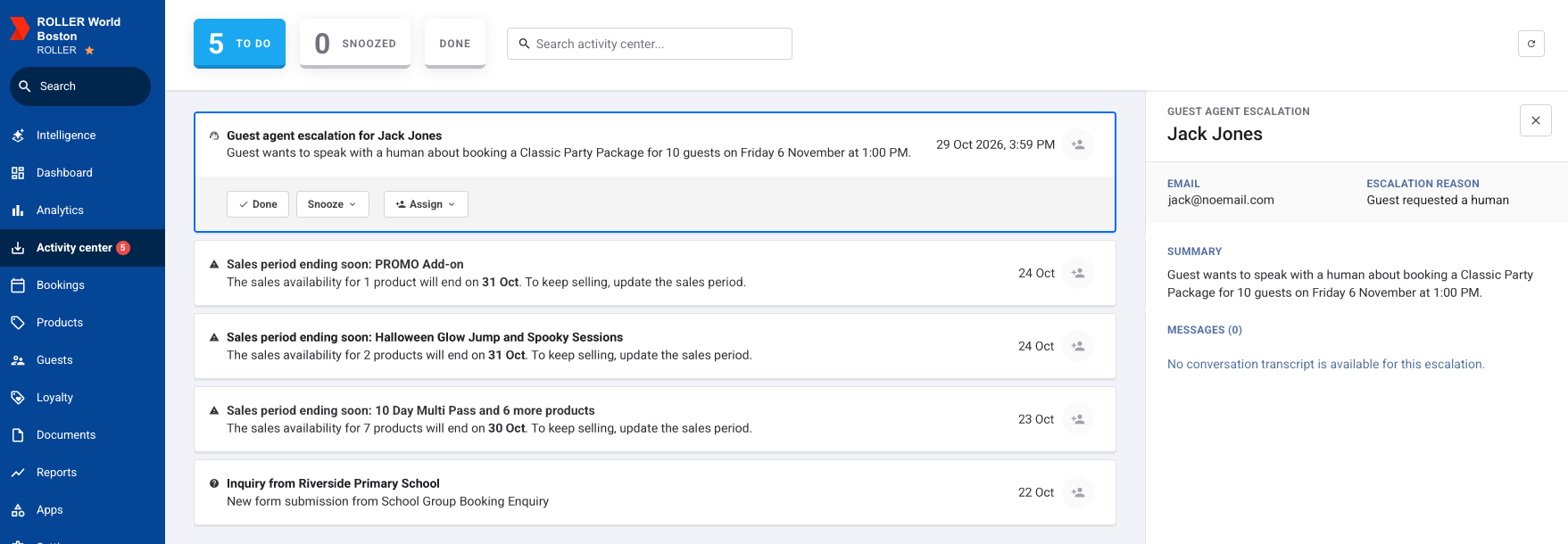
At the venue: Staff get the escalation in the venue's Activity center, with the channel, the guest's contact details, the escalation reason and a summary.
At HQ: You get a copy that names the guest and the venue (eg "Alex raised a Guest Agent escalation at Downtown"). You can assign it, snooze it or mark it as done, the same as any other Activity center notification. The details stay with the venue, so you open them from there.
Either place: When anyone marks the escalation as done, it's marked done at HQ and at the venue. If they undo it, it moves back in both places.
Escalations come from every agent at your managed venues, including agents a venue created itself. The Activity center shows in your HQ account when your HQ account has Guest Agent.
To learn more about the Activity center, see the guide Get started with the activity center.
Follow up an escalation from a managed venue
The permission required to open the full Guest Agent conversation behind an escalation is Can review Guest Agent conversations. The administrator role has this permission enabled by default.
Opening the escalation at its venue gives you everything you need to contact the guest, including what they asked for and how to reach them.
From Venue Manager, in your HQ account, go to Activity center.
Under To do, find the escalation (eg "Alex raised a Guest Agent escalation at Downtown").
On the escalation, select View escalation. Venue Manager switches to that venue and opens the escalation in its Activity center.
Check the escalation details: the guest's contact details, the Escalation reason and the Summary.
To read the whole conversation, select View conversation.
Contact the guest. When you're finished, select Done on the escalation.
The escalation moves to Done at the venue and at HQ.
The Escalation reason shows why Guest Agent passed the conversation on:
Escalation reason | What it means |
|---|---|
Guest requested a human | The guest asked to talk to a person. |
Guest frustration | The guest seemed frustrated with the conversation. |
AI couldn't complete the request | Guest Agent couldn't do what the guest asked. |
Other | Any other reason. |
Find escalations from one venue
When a team looks after a region or a few sites, show only their venues' escalations. In your HQ Activity center, use the venue filter at the top of the page and select one or more venues.
The venue filter works together with the other Activity center filters. For example, you can show only the escalations from one venue that are assigned to you.
Choose who gets escalations at HQ
Escalations from your managed venues are on in your HQ account by default. Choosing the roles that can see and act on them keeps them in front of the team that follows up. For example, if your call center staff have their own role, select only that role so the escalations go to them.
From Venue Manager, in your HQ account, go to Settings > Notifications.
Select Guest Agent escalations.
Under Activity center, select the roles that should see and act on escalations.
Select Save.
For more on notification settings, see the guide Customize activity center notification settings.
FAQs
Do venue staff still get escalations when HQ gets them too?
Yes. The venue gets each escalation in its own Activity center. HQ gets a copy, and marking it as done in either place marks it done in both.
Why didn't HQ get an escalation from one of our venues?
Check two things first: The venue's own Guest Agent escalation notification needs to be on in Venue Manager, under Settings > Notifications, because the HQ receives their copy based on this. In addition, Guest Agent escalations needs to be on in your HQ account. If both are enabled, contact the support team for assistance.
Can HQ get escalations by email?
At HQ, escalations arrive in the Activity center. Each venue can also send its own escalations by email from its notification settings.
Can I see the conversation without switching venues?
No. The HQ copy names the guest and the venue. Select View escalation to open the details at the venue, then select View conversation to read the full transcript.
Does an escalation from a venue's own agent reach HQ?
Yes. Escalations from every agent at a managed venue reach HQ, not only agents HQ shared.
Who can open the full conversation?
Staff with the Can review Guest Agent conversations permission at the venue. Other staff can still see the escalation details in the Activity center.