Guest Agent uses live ROLLER data, which means when you change the price of a product or a session sells out, the agent knows instantly. Information that isn't stored in ROLLER, such as parking, allergens or your refund policy, only updates when you update it. Add it to your knowledge base and keep it current so the agent gives guests accurate answers.
The more complete and accurate your knowledge base is, the fewer conversations need to be escalated to your team. Our recommended topics help you cover the questions guests ask most.
Register your venue for early access
Guest Agent is in early access for eligible venues, and we're rolling it out in stages. It has usage-based pricing, so you pay based on how much your agent is used.
Why your knowledge base matters
Guest Agent pulls live data from ROLLER for things like pricing, availability and bookings, but there's a lot guests ask that isn't in your ROLLER data at all. Things like:
Parking and directions
Food, drinks and allergen info
Refund and cancellation policies
Dress code, age restrictions or other venue-specific rules
Your knowledge base is what fills that gap. The more complete it is, the more guest questions your agent can answer confidently.
Plan your knowledge base
To help you get started, here’s a list of topics venues commonly need to cover, things like parking and getting here, or food, drinks and allergens.
Topic | What to cover | Suggested documentation |
|---|---|---|
Parking and getting here | Parking options and costs, public transport, drop-off zones, accessibility parking. | Parking policy documents, venue map, transport or directions page from your website. |
Bookings and arrivals | Check-in process, what guests need to bring (eg booking confirmation or ID), late arrival or no-show policy, rescheduling process. | Check-in or arrival guide, booking terms and conditions, rescheduling policy. |
Waivers | Whether a waiver is required, who needs to sign (eg all guests, minors need a guardian), how and when it's completed. | Waiver form or policy. |
Food, drinks and allergens | What's available on-site, outside food and drink policy, allergen handling, dietary options. | Menu and catering documents, allergen statement, outside food and beverage policy. |
Refunds and cancellations | Refund windows, non-refundable ticket types, weather or closure policy, how to request a refund. | Refund policy documents, terms and conditions, wet weather or closure policy documents. |
Attractions and things to do | Overview of rides, attractions and activities on offer, age or height restrictions, wait times or booking requirements, suitability for different age groups. | Attractions guide, ride and activity descriptions, age and height restriction chart. |
Accessibility | Wheelchair access, sensory-friendly times, service animal policy, accessible facilities. | Accessibility policy, venue accessibility guide. |
Dress code and venue rules | Footwear requirements, age restrictions, prohibited items, safety rules. | Venue rules documents, safety guidelines. |
Group and party inquiries | General information on party packages, minimum numbers, lead times for bookings. | Party package brochure, party package FAQs. |
Membership or loyalty programs | What's included, how to join, perks. | Membership terms and conditions, program overviews. |
Lockers, personal belongings and lost property | Locker availability and cost, what guests can and can't bring in, how lost property is handled and how to report or collect it. | Locker and personal belongings policy, lost property process. |
Special events and promotions | Time-limited offers, seasonal events, closures for private hire. | Current promo documents. |
Photography and filming | Whether photography or filming is allowed, any restrictions (professional cameras, drones, other guests in shot), photo package options if offered. | Photography policy, photo package and pricing info. |
Contact and escalation info | When and how a guest can reach a real person, phone or email for urgent issues. | Contact page, staff escalation policy. |
This list covers the topics guests ask about most, so working through as many of these as you can before going live gives your agent a strong foundation to answer confidently from day one.
But there may still be small gaps in your knowledge base. As real guest conversations come in, you'll likely spot topics or questions you hadn't thought to include. That's expected, not a sign that something is wrong. Guest Agent is designed to escalate anything it can't confidently answer, so gaps in your knowledge base won't mean guests are left without a response. Use these escalations, along with your regular conversation reviews, to keep building out your knowledge base over time.
Add a knowledge source
The permission required to set up and manage Guest Agent is Can edit Guest Agent configuration. The administrator role has this permission enabled by default.
Each agent has its own knowledge base, so add documents to every agent that needs them.
You can create and upload one comprehensive document that covers all the information you’d like to add to your knowledge base, or you can create and upload many different documents. As long as the information you want to add is covered, how you handle your documents is up to you. There’s no file limit and there are two file types you can upload:
.md (recommended)
.pdf
We recommend using an AI tool, such as ChatGPT or Claude, to create your knowledge base documents. AI tools can organize your information into clear headings and sections, which makes it easier for AI like Guest Agent to find the right answer for your guests.
Ready to start building? Point your agent at the right information and let it do the rest.
From Venue Manager, go to Intelligence > Guest Agent > All agents.
Select the agent, then select the Knowledge Base tab.
Select Upload file, or drag and drop the file you want to add in the space provided.
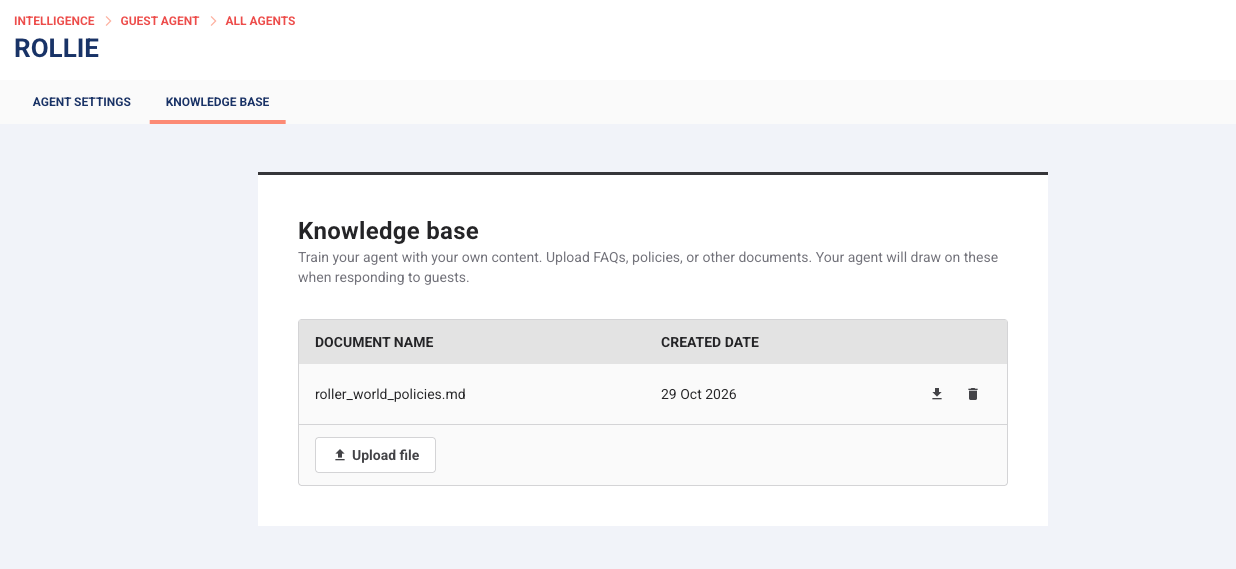
Repeat the steps above for each document you want to add. The more you add, the more your agent has to work with, and the more confidently it can respond when a guest asks something new.
If you’d like to delete an outdated source, select the bin icon next to the document and then select Remove.
If your HQ shared this agent, documents HQ added show an HQ label and you can't remove them. You can add your own, such as parking or directions for your venue.
Keep your knowledge base up to date
Your knowledge base isn't a set-and-forget step. As your venue's information changes, so should the information your agent is working from; otherwise, even a great knowledge base will start giving outdated answers. A quick update whenever something changes at your venue goes a long way.
Reviewing your agent's conversations shows you which answers need updating. See the guide Review and refine Guest Agent responses.