Track key growth metrics to help you improve member acquisition and retention. This dashboard provides a complete view of your recurring membership data, from total member count and lifetime value to net revenue generated and sales of new memberships.
Questions answered
How many active recurring members do we currently have?
What is the average charge per member?
What are our projected monthly billings from memberships?
How much new and lost billing have we seen recently?
What is the average duration of active and completed memberships?
How does the volume of memberships sold influenced our monthly net revenue?
This dashboard displays recurring membership revenue as net revenue, reflecting recognized revenue after tax deductions for the reported period. Initial payments for recurring memberships are recognized as net revenue at the time of purchase, and each subsequent recurring payment is recognized upon receipt.
Actionable insights
Keep track of your current active members.
Monitor the average charge per member to understand its impact on lifetime value and overall revenue.
Get a forecast of your expected monthly income from memberships.
Identify areas for improvement by monitoring new and lost revenue.
Track the average duration of active and completed memberships to assess membership lifespan.
Determine the impact of monthly membership sales on net monthly revenue.
Access the dashboard
The permission Can access Analytics is required to view dashboards and reports. Administrator and manager system roles have this permission enabled by default.
From Venue Manager, go to Analytics > Dashboards.
Search for an select Recurring membership overview.
Dashboard metrics and calculations
Review the metrics and charts shown in the dashboard, then refer to the table below to understand how they are defined and calculated.
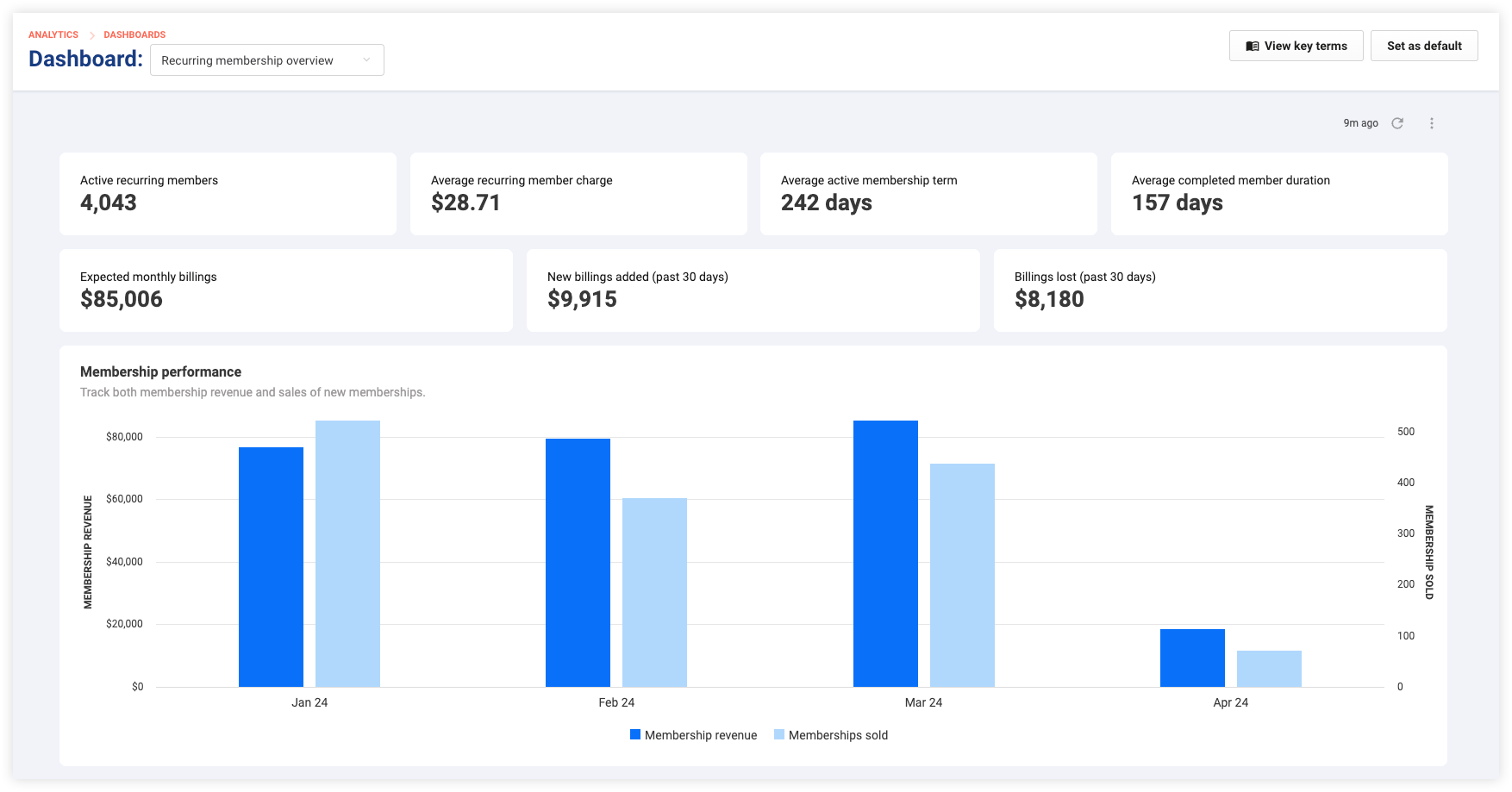
Metrics | Description / Calculation |
|---|---|
Active recurring members | The current count of all members with an active status, with current and pending cancelation membership statuses, and all payment frequencies. |
Average recurring member charge | Average amount paid by active members, with current and pending cancelation membership statuses, no matter what the recurring payment frequencies are. |
Average active membership term | This metric calculates the average duration that members stay active, taking into account those who currently have a current membership status and term of more than 25 days. |
Average completed member duration |
|
Expected monthly billings |
|
New billings added (Past 30 Days) | Value of new current recurring membership billings added in the last 30 days, averaged out for all recurring payment frequencies. |
Billings lost (Past 30 days) | The amount of net revenue lost from current memberships in the last 30 days, averaged out for all recurring payment frequencies. |
Membership performance | A bar chart comparison of membership net revenue to the number of memberships sold, showing how changes in membership sales can impact revenue earned. |
Fixed-time range
Date filters are not included in the dashboard. Review regularly to monitor the recent health of your recurring membership programs.
Learn how you can interact with and download the data in a dashboard.
FAQ
How can I interpret the recurring membership performance chart?
The membership performance chart compares recurring monthly net revenue recognized (gross revenue minus tax payable in line with accrual accounting) to the number of recurring memberships sold, helping you understand sales effectiveness and net revenue trends.
What does active recurring member mean?
An active recurring member is someone currently subscribed to the membership, with regular recurring payments, and includes those with current and pending cancelation statuses in ROLLER.
How are expected monthly billings calculated?
Monthly billings are calculated by adjusting for different payment frequencies to ensure a consistent monthly figure. Monthly payments are included as is, annual payments are divided by 12, and weekly payments are multiplied by 4.3.